

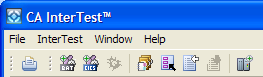
There are two kinds of toolbars in CA InterTest:
The main toolbar is displayed at the top of the main window directly beneath the menu bar. The contents of this toolbar change based on the active view. You can find explanations of all the buttons on the toolbar in the online help.
There are also individual view toolbars, which appear in the title bar of a view. Actions in a view's toolbar apply only to the view in which they appear. The following example shows the Bookmarks view toolbar:

Note: Some view toolbars include a Menu button, shown as an inverted triangle  that contain actions for the view.
|
Copyright © 2015 CA Technologies.
All rights reserved.
|
|