

CA InterTest contains a group of views that provide all the functions you need to debug your programs.
A view is a visual component within the CA InterTest window. It is typically used to navigate a hierarchy of information or display properties for a program listing, which displays the program being debugged. Modifications made in a view are generally done with dialogs.
The following illustration shows the CA InterTest main window with several views open.
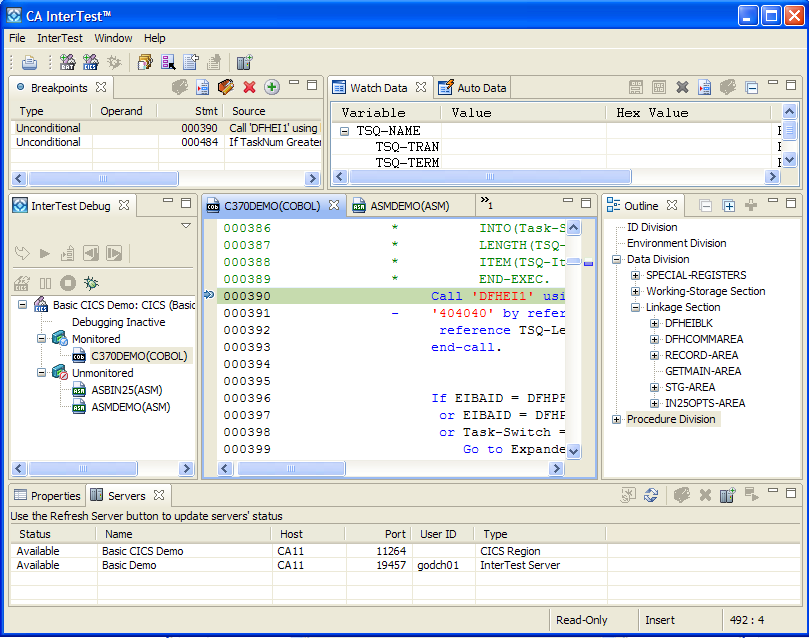
Usually, only one instance of a particular type of view may exist within the CA InterTest window. Views might appear by themselves or stacked with other views in a tabbed notebook. To activate one of these views, click its tab. Only one view is active at one time. The active view is the one whose tab is highlighted. In this example, the program listing is active.
The exception to only one type of view existing within the CA InterTest window is the Program Listing area, where several imported program listing files can be open at one time. The listings behave like sub-views that are grouped together (or stacked) in the Program Listing area.
You can change the default window layout by opening views, closing views, or docking views in different positions.
|
Copyright © 2015 CA Technologies.
All rights reserved.
|
|