

Advanced authentication requires you to use a CA SiteMinder® Policy Server in your implementation. The application server hosting the CA Identity Manager Server is on a different operating environment from Web Server. To provide forwarding services, the Web Server requires:
The Web Agent controls the access of users who request CA Identity Manager resources. Once the users are authenticated and authorized, the Web Agent allows the Web Server to process the requests.
When the Web Server receives the request, the application server plug-in forwards it to the application server hosting the CA Identity Manager Server.
The Web Agent protects CA Identity Manager resources that are exposed to users and administrators.
When the policy administrator and the identity administrator work together to integrate CA SiteMinder® into an existing CA Identity Manager installation, the CA Identity Manager architecture expands to include the following components:
Protects the CA Identity Manager Server. The Web Agent is installed on the system with the CA Identity Manager Server.
Provides advanced authentication and authorization for CA Identity Manager.
The following figure is an example of a CA Identity Manager installation with a CA SiteMinder® Policy Server and Web Agent:
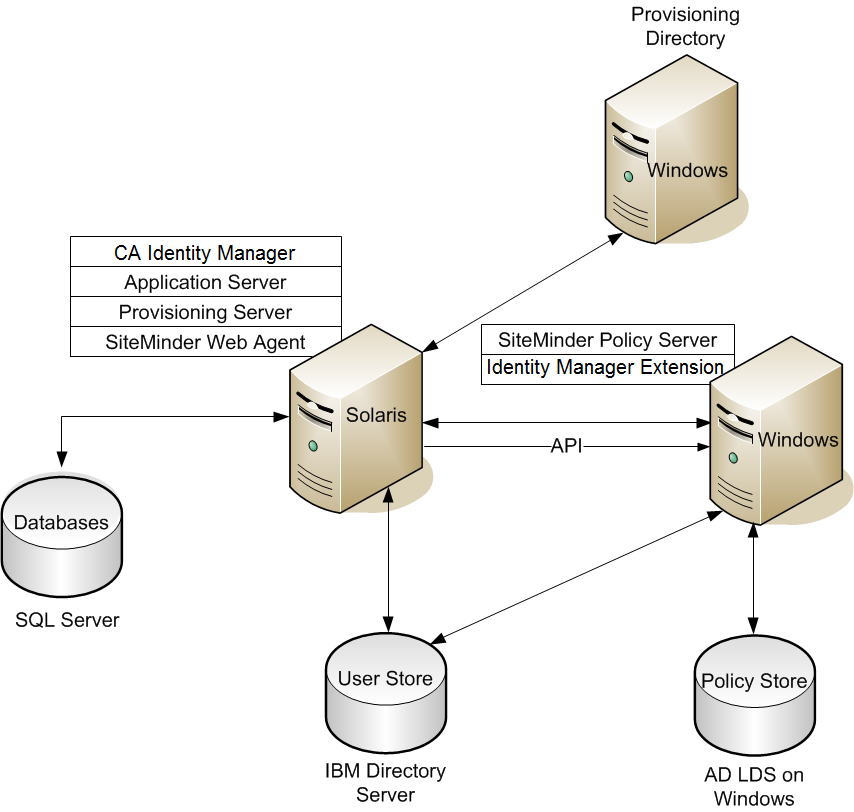
Note: The components are installed on different platforms as examples. However, you can choose other platforms. The CA Identity Manager databases are on Microsoft SQL Server and the user store is on the IBM directory Server. The CA SiteMinder® Policy Store is on AD LDS on Windows.
Completing this process requires two roles: the CA Identity Manager identity administrator and the CA SiteMinder® policy administrator. In some organizations, one person fills both roles. When two people are involved, close collaboration is required to complete the procedures in this scenario. The policy administrator begins and ends this process; the identity administrator does all the steps in the middle.
Important! For CA Identity Manager installations starting with Release12.5 SP7, the Java Cryptography Extension Unlimited Strength Jurisdiction Policy Files (JCE libraries) are required. Download these libraries from the Oracle Web site. Load them into the following folder: <Java_path>\<jdk_version>\jre\lib\security\.
The following diagram illustrates the complete process of integrating CA SiteMinder® into CA Identity Manager:
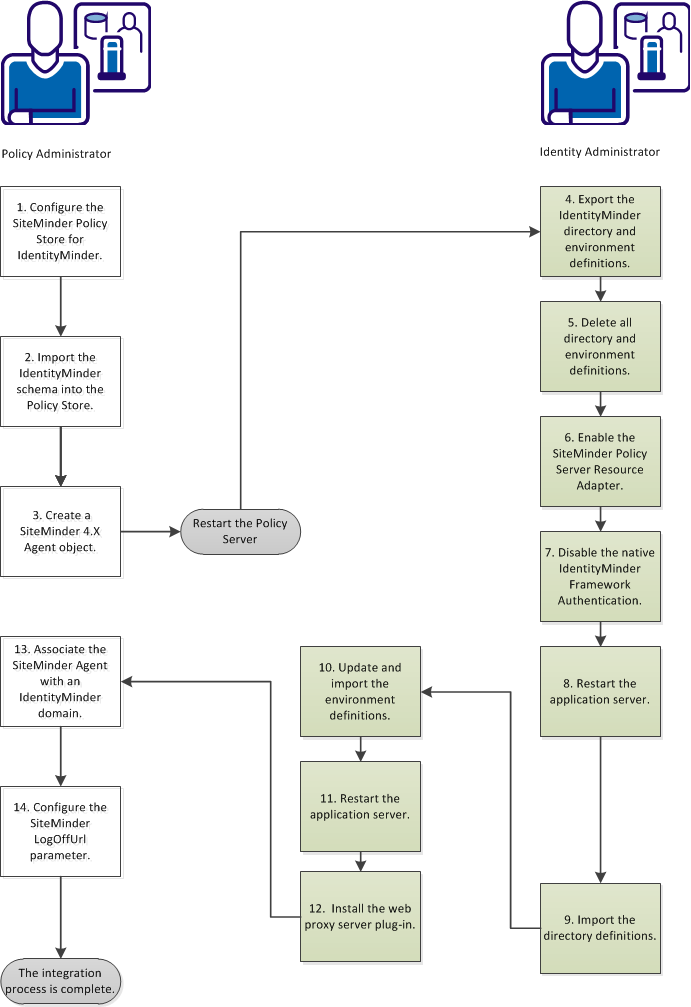
Follow these steps:
|
Copyright © 2014 CA.
All rights reserved.
|
|