

To configure roles-based access control to protected resources, a CA SiteMinder® administrator associates a CA Identity Manager Environment with a Policy Domain in the Policy Server User Interface. The administrator creates a policy to protect an application and associates a role or roles with that policy. Users who have an associated role can access the protected application.
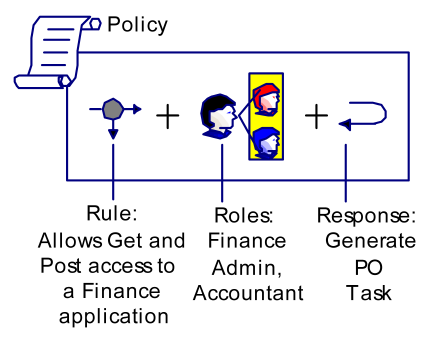
A CA SiteMinder® administrator binds roles to security policies that define how users interact with resources. Policies link with the following objects:
Identify a set of policy affected users.
Identify users who have been assigned a set of privileges in CA Identity Manager.
Identify a resource and the actions that are allowed or denied for the resource. The resource is typically a URL, application, or script.
Determine a reaction to a rule. When a rule fires, responses are returned to a CA SiteMinder® Agent.
CA Identity Manager uses CA SiteMinder® responses to deliver specific task and role information to a protected resource.
You can bind CA SiteMinder® policies to users, or to roles, or to users and roles. Assume that a user or role member attempts to access a protected resource. CA SiteMinder® uses information in the policy to determine whether to grant access, and to trigger responses.
The following figure illustrates the relationship of policy objects in a role-based policy.
CA SiteMinder® policies are created in policy domains, which logically tie user directories to protected resources. The following figure illustrates the relationship of policy objects in a role-based policy.
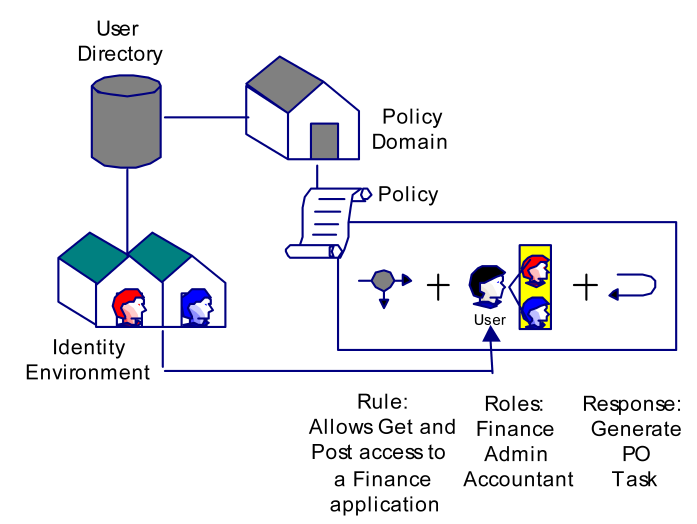
To supply user entitlements to a protected application, the CA SiteMinder® administrator pairs a rule with the policy of an application with a response. The response contains a CA SiteMinder®-generated response attribute that retrieves entitlement information from CA Identity Manager.
When CA SiteMinder® authorizes a role member for a protected resource, the following events take place:
|
Copyright © 2014 CA.
All rights reserved.
|
|