

By default, CA Identity Governance uses the group name and parameter name strings of the parameter declaration to display prompts for a workflow parameter.
For example, when parameters are declared as follows:
flow.CustomParamGroup.Boolean.PromptSelectOption
flow.CustomParamGroup.PortalUser.PromptForReviewer
flow.CustomParamGroup.AccountableType.PromptForRACI
CA Identity Governance generates interface elements and controls as shown in the following figure:

You can define text strings to replace these parameter declaration strings.
The following properties files store text strings for the CA Identity Governance portal interface:
When CA Identity Governance server runs on a JBoss application server, these files are in the following directory:
gm_install\Server\eurekify-jboss\server\eurekify\deploy\eurekify.war\WEB-INF\classes\com\eurekify\web\application
Note: gm_install is the CA Identity Governance installation directory.
Edit the relevant files to declare strings for your workflow parameters.
Note: Restart CA Identity Governance server to use these new strings in the portal.
Example: Text Labels for Workflow Parameters
The following statements define strings for the custom parameters of the previous example:
flow.CustomParamGroup = Custom Reviewer Selection Options
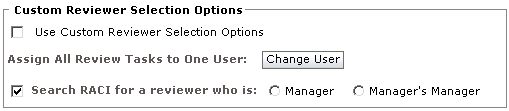
flow.CustomParamGroup.Boolean.PromptSelectOption = Use Custom Reviewer Selection Options
flow.CustomParamGroup.PortalUser.PromptForReviewer = Assign All Review Tasks to One User
flow.CustomParamGroup.AccountableType.PromptForRACI = Search RACI for a reviewer who is
Note: Define a separate string for the group name, as shown.
Based on these string definitions, CA Identity Governance generates interface elements and controls as shown in the following figure:
|
Copyright © 2014 CA.
All rights reserved.
|
|