

CA Identity Governance Programming Guide › Customizing Business Flows › Common Functionality in CA Identity Governance Workpoint Processes › System, Workflow, and Task Parameters › Custom Workflow Parameters › Example: Workflow Parameters from Default CA Identity Governance Certification Processes
Example: Workflow Parameters from Default CA Identity Governance Certification Processes
The following figure shows the Properties screen of the certification wizard, with prompts for workflow parameters drawn from default CA Identity Governance certification processes.
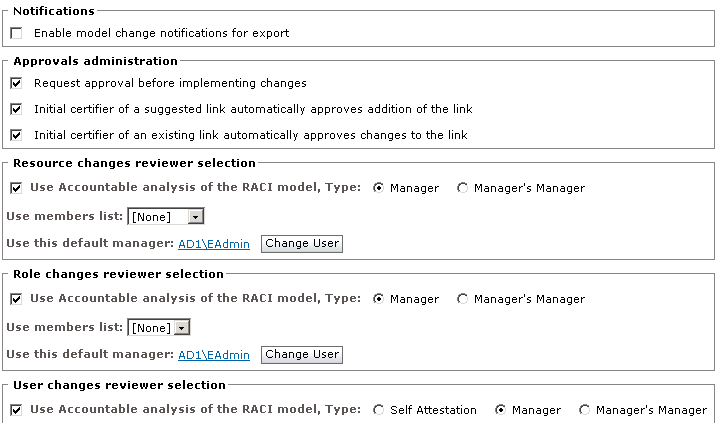
The fields in the Properties screen shown previously correspond to the following parameters in default CA Identity Governance Workpoint processes. These fields appear in the Properties screen when a certification uses these Workpoint processes, or any processes that declare these parameters.
- The Enable model change notifications... option under Notifications results from the flow.notifications.boolean.isModelChangeNotificationOn parameter.
- Under Approvals administration, the following options appear:
- The Request approval before implementing changes option results from the flow.requestChangeApproval.boolean parameter.
- The initial certifier of an suggested link... option results from the flow.requestChangeApproval.boolean.autoApproverSuggest parameter.
- The initial certifier of an existing link... option results from the flow.requestChangeApproval.boolean.autoApproverCertify parameter.
- Under Resource changes reviewer selection, the following options appear:
- The User Accountable analysis of the RACI model option results from the flow.resourceApproval.accountableType parameter.
- The Use member list option results from the flow.resourceApproval.resourceMembersList parameter.
- The Use this default manager option results from the flow.resourceApproval.portalUser.defaultManager parameter.
Similarly, the following parameters generate the Role changes reviewer selection options:
- flow.roleApproval.accountableType
- flow.roleApproval.roleMembersList
- flow.roleApproval.portalUser.defaultManager
Similarly, the following parameters generate the Role changes reviewer selection options:
- flow.userApproval.accountableTypeUser
- flow.userApproval.portalUser.defaultManager
Note: The radio button options generated for the flow.userApproval.accountableTypeUser parameter differ from the options generated for parallel role and resource accountableType parameters.
CA Identity Governance draws the text labels for these groups and options from the localization file, as in the following examples:
- These entries in the localization file apply to the Notifications area of the screen.
flow.notifications = Notifications
flow.notifications.boolean.isModelChangeNotificationOn = Enable model change notifications for export
- These entries in the localization file apply to the Resource changes reviewer selection area of the screen.
flow.resourceApproval = Resource changes reviewer selection
flow.resourceApproval.accountableType = Use Accountable analysis of the RACI model, Type:
flow.resourceApproval.resourceMembersList = Use members list:
flow.resourceApproval.portalUser.defaultManager = Use this default manager:
CA Identity Governance automatically generates check boxes, radio button options, and other controls based on the type specified for each parameter. For example, Boolean parameters display a single check box, and member list parameters display a drop-down list of related member lists.
Copyright © 2014 CA.
All rights reserved.
|
|