

CA Arcot cannot delete accounts.
If you use CA Identity Manager to delete an account from CA Arcot, CA Identity Manager simulates account deletion using the custom attribute CA.ILM.WF.USER_DELETE. This custom attribute is CA.ILM.WF.USER_DELETE. When it has a value of 1, the account is considered to be deleted.
Note: For information about custom attributes, see Set Custom Attributes.
You can use CA Identity Manager to delete an account directly or indirectly:
When you use CA Identity Manager to delete an account from CA Arcot directly or indirectly, CA Identity Manager does the following steps:
Note: CA Identity Manager cannot delete a user whose certificate is revoked but replaceable. If you try to delete such a user, the operation fails.
During an explore-and-correlate operation, CA Identity Manager ignores all accounts that have a custom attribute CA.ILM.WF.USER_DELETED with a value of 1.
During an account synchronization operation, CA Identity Manager checks for the custom attribute CA.ILM.WF.USER_DELETED. If the attribute is present and its value 1, a Not Found message appears.
Recreating an account after adding a provisioning role
When you add a role to a user, that role can require a new account. In this situation, CA Identity Manager does the following steps:
If the attribute has a value of 1 and the account is suspended, CA Identity Manager removes the suspended membership and modifies the account, instead of adding a new account.
If the attribute exists and has a value other than 1, <idmgr treats the account as usual.
This scenario shows how an administrator uses CA Identity Manager to give a user access to an online banking application that requires two-factor authentication.
In this scenario, a customer wants to access their DemoBank OnLine accounts using their mobile device.
The CA Identity Manager Administrator uses CA Identity Manager to provision a user with an OTP. The customer then uses the OTP to activate an ArcotOTP account on their mobile device. An ArcotOTP account allows the customer to generate a passcode on their mobile device so that they can access their on-line banking accounts.
This scenario assumes that:
Note: For information about setting up an email notification in CA Identity Manager see the chapter "Email Notifications" in the CA Identity Manager Administration Guide.
The following illustration shows how an administrator gives a customer access to their DemoBank accounts using the passcode generated on their mobile device.
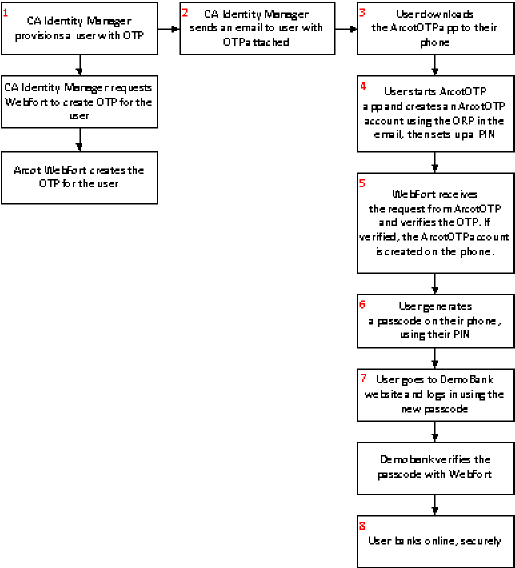
Example: Provision a user with Arcot credentials to Access online bank accounts
This example shows how a CA Identity Manager administrator provisions a user with an OTP, as shown in step 1 of the previous diagram.
The customer then uses the OTP they received in the email to create an ArcotOTP account on their mobile device. This account allows them to access their on-line banking service, as shown in steps 3 to 8 of the previous diagram.
Follow these steps:
The Generate Arcot User OTP page appears.
CA Identity Manager sends an email to the customer with the OTP.
The customer uses the OTP to create an ArcotOTP account on their mobile device. The customer then generates a passcode so that they can access their DemoBank accounts.
CA Identity Manager administrators can provision a user with an ArcotID. An ArcotID allows a user to access a client application that requires two-factor authentication. For example, administrators can generate an ArcotID credential for a user so that they can access their accounts on an online banking service.
An ArcotID is a software key which is downloaded to the user's computer and is used for secure login, together with the ArcotID password.
In this scenario, a customer wants to access their DemoBank accounts using DemoBank Online. An administrator uses CA Identity Manager to provision an ArcotID to a customer, to allow the customer to access their DemoBank accounts on their computer.
This scenario assumes that:
Note: For information about setting up an email notification in CA Identity Manager see the chapter "Email Notifications" in the CA Identity Manager Administration Guide.
The following illustration shows how an administrator uses CA Identity Manager to provision a user with an ArcotID.
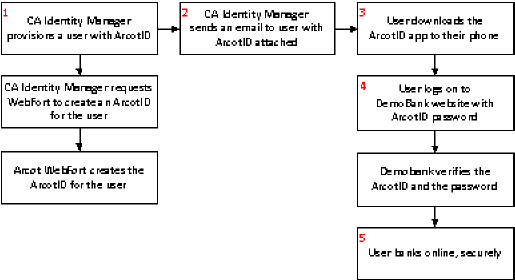
Example: Provision a user with an ArcotID
The following example shows you how a CA Identity Manager administrator provisions a user with an ArcotID (see step 1 in the diagram). The customer then downloads the ArcotID from the Arcot download page and uses the password provisioned by the administrator to access their DemoBank accounts.
Follow these steps:
The Generate Arcot User ID page appears.
The ArcotID Password field appears.
CA Identity Manager sends this password to the user in an email.
CA Identity Manager sends an email to the customer with the password you specified in step 7.
The customer downloads the ArcotID onto their computer, then logs in to DemoBank using the credentials specified in the email.
|
Copyright © 2013 CA.
All rights reserved.
|
|