

When an Intel AMT-enabled asset enters the quarantine mode, a filter is applied to enforce a policy for the incoming and outgoing network traffic on the Intel AMT asset. Any Intel AMT asset that enters the quarantine mode will have only AMT and DSM ports open; therefore, no network access is allowed for any user, application, or internet application. However, DSM administrators can execute agents and perform DSM-related management of the Intel AMT asset.
To put an Intel AMT asset in quarantine
The Homepage tab appears.
Note: The Quarantine Asset link is available only if Intel AMT is enabled on the asset.
A confirmation message appears.
The Intel AMT asset is successfully put under quarantine, as shown in the following illustration:
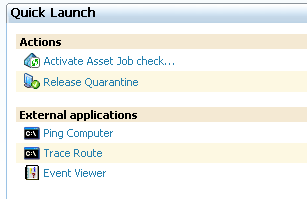
After the Intel AMT asset is successfully put under quarantine, the Quarantine Asset link changes to the Release Quarantine link. Click the Release Quarantine link whenever you want to release the Intel AMT asset from quarantine.
|
Copyright © 2013 CA.
All rights reserved.
|
|