

The Hardware section contains the entries for General Inventory and Additional Inventory. The General Inventory section can have only those inventory groups and attributes that are collected by the CA ITCM agents. If you want to add any user-defined groups and attributes, you must create them outside the GeneralInventory group tag. The user-defined groups and attributes appear under the Inventory, Additional folder in the DSM Explorer.
The hardware section has the following tags:
Defines the group name under which the inventory items are created.
Defines the name, type, and subtype of the inventory item.
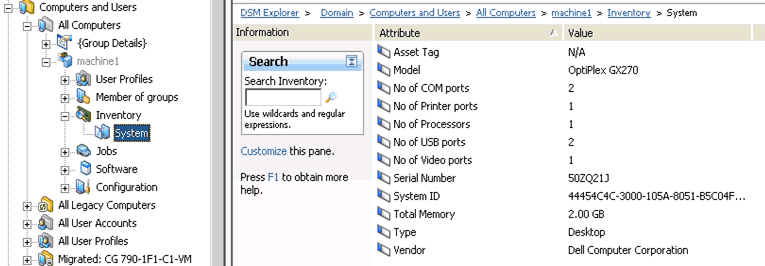
Example: Hardware Section (Attribute and Value)
The following code is an example of the hardware section.
<hardware>
<group name="GeneralInventory">
<group name="System">
<attribute name="Total Memory" type="int64" subtype="byte">2147483648</attribute>
<attribute name="Model" type="string">OptiPlex GX270</attribute>
<attribute name="Type" type="string">Desktop</attribute>
<attribute name="No of Processors" type="int32" subtype="normal">1</attribute>
<attribute name="No of COM ports" type="int32" subtype="normal">2</attribute>
<attribute name="No of Printer ports" type="int32" subtype="normal">1</attribute>
<attribute name="No of USB ports" type="int32" subtype="normal">2</attribute>
<attribute name="No of Video ports" type="int32" subtype="normal">1</attribute>
<attribute name="Vendor" type="string">Dell Computer Corporation</attribute>
<attribute name="Serial Number" type="string">50ZQ21J</attribute>
<attribute name="Asset Tag" type="string">N/A</attribute>
<attribute name="System ID" type="string">44454C4C-3000-105A-8051-B5C04F32314A</attribute>
</group>
</group>
</hardware>
The following illustration shows the GUI results of the above code.
Example: Hardware Inventory File (Table Format)
The following code shows an example of the hardware inventory file.
<hardware>
<group name="GeneralInventory">
<group name="FileSystem">
<group name="LocalFileSystem" tableid="0001">
<attribute name="Device" type="string">\Device\HarddiskVolume1</attribute>
<attribute name="FileSystem" type="string">FAT32</attribute>
<attribute name="Free" type="int64" subtype="G">2230124544</attribute>
<attribute name="Mount Point" type="string">C:\</attribute>
<attribute name="Name" type="string">C:\</attribute>
<attribute name="Serial Number" type="string">5872-D416</attribute>
<attribute name="Size" type="int64" subtype="G">3784294400</attribute>
<attribute name="Type" type="string">Fixed</attribute>
<attribute name="Used" type="int64" subtype="G">1554169856</attribute>
<attribute name="Used %" type="int32">20</attribute>
<attribute name="Volume Label" type="string">C</attribute>
</group>
<group name="LocalFileSystem" tableid="0002">
<attribute name="Device" type="string">\Device\HarddiskVolume2</attribute>
<attribute name="FileSystem" type="string">FAT32</attribute>
<attribute name="Free" type="int64" subtype="G">2230124544</attribute>
<attribute name="Mount Point" type="string">D:\</attribute>
<attribute name="Name" type="string">D:\</attribute>
<attribute name="Serial Number" type="string">5872-D423</attribute>
<attribute name="Size" type="int64" subtype="G">43784794400</attribute>
<attribute name="Type" type="string">Fixed</attribute>
<attribute name="Used" type="int64" subtype="G">41554269856</attribute>
<attribute name="Used %" type="int32">89</attribute>
<attribute name="Volume Label" type="string">D</attribute>
</group>
</group>
</group>
</hardware>
The following illustration shows the GUI results of the above code.

|
Copyright © 2013 CA.
All rights reserved.
|
|