

The general section contains the entries for the inventory item. The items allowed in the header section are determined by the type of item being described. Some header item should only be provided in an <asset> <general> section, others only in <user> <general> sections. There are also some attributes that can be provided in either a user or asset general section.
A user can be delivered alone or with a computer. If a user is delivered with a computer, the user is linked to the computer. This relationship is visible in the DSM Explorer.
The following table lists the general section tags:
|
Name |
Description |
Header |
|---|---|---|
|
vendor |
string optional |
asset |
|
serial_number |
string optional |
asset |
|
asset_tag |
string optional |
asset |
|
host_name |
not fully qualified, required |
asset |
|
host_key |
string optional key will be generated if not supplied |
asset |
|
class_id |
Platform name as a string or a number Note: See the detailed list of platform names in the "Platform Names and IDs" appendix. |
asset |
|
Network_id |
Optional Note: Supports multiple network interfaces in the registration section of the XIU file. |
asset |
|
default_address |
required |
asset |
|
default_mac |
required |
asset |
|
default_hostname |
required |
asset |
|
default_subnet_mask |
optional |
asset |
|
collect_time |
time in seconds, optional |
asset |
|
trustlevel |
integer between 1 and 5, optional |
asset |
|
origin
|
string optional |
asset |
|
fileid |
Max length 36 |
user |
|
URI |
required |
user |
|
user_name |
required |
user |
|
domain_name |
N/A |
user |
|
previous_uri |
N/A |
user |
|
r_usage_list |
N/A |
user |
|
r_name |
N/A |
user |
|
r_proc_os_id |
N/A |
user |
|
r_ip_address |
N/A |
user |
|
user_item_1 |
N/A |
common |
|
user_item_2 |
N/A |
common |
|
user_item_3 |
N/A |
common |
|
user_item_4 |
N/A |
common |
|
r_computer |
N/A |
common |
|
collect_time |
N/A |
common |
|
trustlevel |
Int 1 to 5 |
common |
|
origin |
String 64 char max |
common |
Note: If the MAC address is not available, you can specify the UUID of the asset.
Example: User Only
The format for a user only in the file is as follows:
<asset>
<user>
<general>     </general>
<hardware>    </hardware>
<software>    </software>
</user>
</asset>
The hardware and software section are optional in both the asset and user sections of the file.
Example: User and Asset
The format for a user delivered with an asset is as follows:
<asset>
<general>     </general>
<hardware>    </hardware>
<software>    </software>
<user>
<general>	</general>
<hardware></hardware>
<software>	</software>
</user>
</asset>
Example: General section
The following is a code example for the General Section.
<?xml version="1.0" encoding="utf-8" ?>
<asset translator="ACBsFmt" version="1_0">
<general>
<host_name>machine1</host_name>
<default_hostname>machine1.domain.com</default_hostname>
<default_address>150.120.13.119</default_address>
<default_mac>00:0D:56:CB:C1:ED</default_mac>
<class_id>21</class_id>
<network_id>
		<mac_address>mac</mac_address>
		<ip_address>ip</ip_address>
		<dns_name>name</dns_name>
		<subnet_mask></subnet_mask>

	</network_id>
<host_key>70669be2-1fed-4201-9777-d7137486dcab</host_key>
<origin>User Keyed</origin>
</general>
</asset>
Note: Default_hostname, default_address, default_subnet_mask are the required entries. The network_id section is optional. You can include multiple network_id sections. The default_hostname, default_subnet_mask, default_mac, are used in the default_XXX fields, in the common_asset_report. Additional network_id sections are populated into the registration message.
The following illustration shows how the general section inventory looks when viewed in the DSM Explorer.
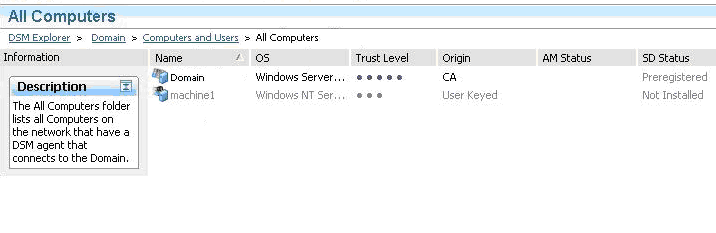
In the preceding illustration, note the following:
|
Copyright © 2013 CA.
All rights reserved.
|
|