

Customizing Asset Management › Asset Collector › Viewing the Origin and Trust Level › Origin and Trust Level of the Hardware Inventory
Origin and Trust Level of the Hardware Inventory
You can view the origin and trust level of the hardware inventory from the following locations in the DSM Explorer:
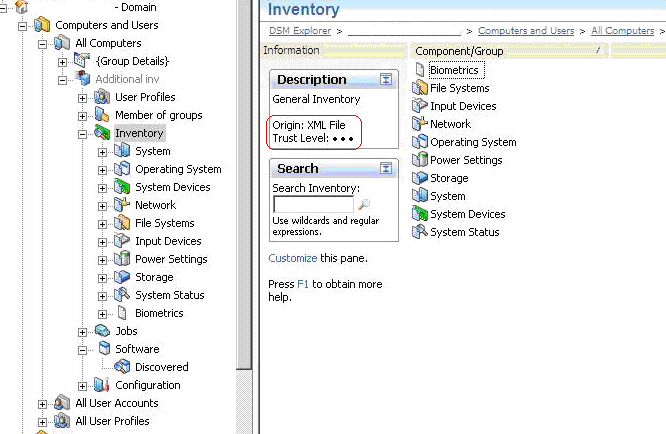
- The Information pane of the Inventory folder. You can select any inventory item to see its origin and trust level in the information pane, as shown in the following illustration:
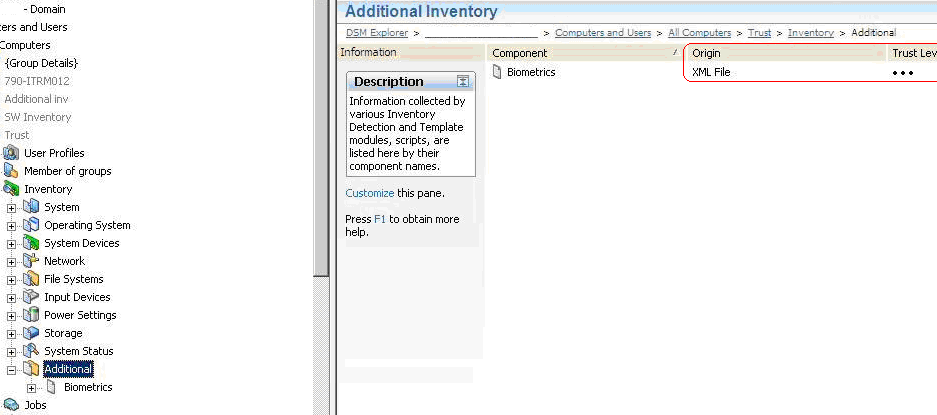
- The Origin and Trust Level columns in the right pane of the additional inventory folders. These columns are hidden by default. You can enable them by right-clicking the column header and selecting Origin and Trust Level, as shown in the following illustration:
Copyright © 2013 CA.
All rights reserved.
|
|