

Configuring Asset Management › Collect Tasks › Software Usage › Software Usage Components › View Utilization Information
View Utilization Information
The DSM Explorer presents the usage information in various formats that helps you analyze the data easily.
To view the utilization information
- Navigate to Domain, Computers and Users, All Computers/All User Accounts, Computer/User Account, Software, Usage folder.
The right pane displays all the applications configured for software usage monitoring.
- Select an application in the right pane and click View in the Tasks section.
The Online/Offline Utilization window appears.
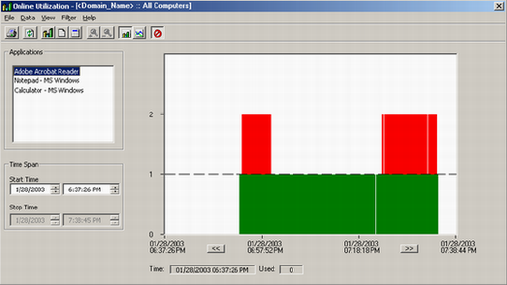
In the above illustration, note the following:
- The dotted horizontal line shows when the approved number of licenses (configurable) was exceeded.
- From the menu bar, choose Data to find the view you want to activate. The views are Graph, Statistics, and Detail.
- Statistics presents detailed information on the assets using the selected application in the specified time range.
- A report on the selected application is given in the list for the time period selected in the graph.
Copyright © 2013 CA.
All rights reserved.
|
|