

Symptom:
You are experiencing intermittent or ongoing problems with the distribution or collection of data in your asset management environment and have verified that the affected components are active and able to communicate with each other. One example of this problem may be the failure of an otherwise fully functioning asset management agent to return inventory information.
Solution:
If you have determined that the product components are properly running and active, and have ensured that two-way communication is possible, use the camping command to determine if this communication problem is due to the level of network protocol support in the environment.
Always try to use User Datagram Protocol (UDP) as the preferred/default connection protocol. The only exceptions to this rule are when it is determined that one of the following has occurred:
For example:
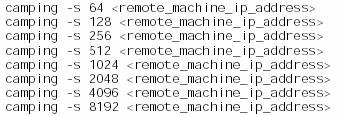
If you determine that there is a size restriction, specify smaller increments to try to establish the exact maximum size that can be supported.
Next, establish whether the maximum size you have determined actually is reached by CAM. You can do this by examining the CAM trace logs covering a typical transfer (or series of transfers). Look for lines like the following in the CAM trace logs:
send_message(10.1.1.14) called
Seq 41, Fd (Sec 0), from uxkul01/CAIFTRANS, to NTAOC04/CAIFTRANS, len 8198, data ><, created 43434, life 60, notify: yes, src 10.7.1.1, dst 10.1.1.14
In this example, len 8198 in the second line refers to the size of the message packet that CAM is trying to send (in this case 8198 bytes). You can then establish the largest packet size that CAM has by looking for this field in all the messages that have been sent by CAM. If this exceeds the size of the maximum UDP packet (as determined in the previous step through the use of the camping -s switch), consider increasing or removing the UDP packet size restriction.
If the asset management inventory collection failed, it is possible that the size of that inventory collection (which, for an initial collection, may be large) may have exceeded the maximum size for UDP packets in your network.
In some cases, an intermediate router has a smaller MTU size restriction than either the originating or destination point. If that intermediate router fails to send the proper ICMP response to the sending host, indicating that condition, it is known as a black hole router. If you experience problems with dropped packets that are similar in size, this may be your problem.
Check the Microsoft knowledge base for more information on the following topics:
|
Copyright © 2013 CA.
All rights reserved.
|
|