

Creating data structure diagrams with CA IDMS Schema Mapper can be either a one-step or a two-step procedure:
Step 1--Execute CA IDMS Schema Mapper, specifying the schema or subschema to be represented using the PROCESS statement. You can also use any of the optional statements.
As shown in Exhibit 1.4, Step 1 provides you with CA IDMS Schema Mapper's four outputs: the data structure diagram, the Transfer File, the Cross-Reference Report, and the Audit Report. The Transfer File is created as a time-saving device for Step 2.
Step 2--Execute CA IDMS Schema Mapper again, making modifications to the input, if needed, by using the optional parameters. You can use the Transfer File as input whenever you execute the second step.
The second step can be iterative: you can repeat it as many times as necessary, depending on whether the preceding data structure diagram meets your needs. Exhibit 1.4 illustrates this process.
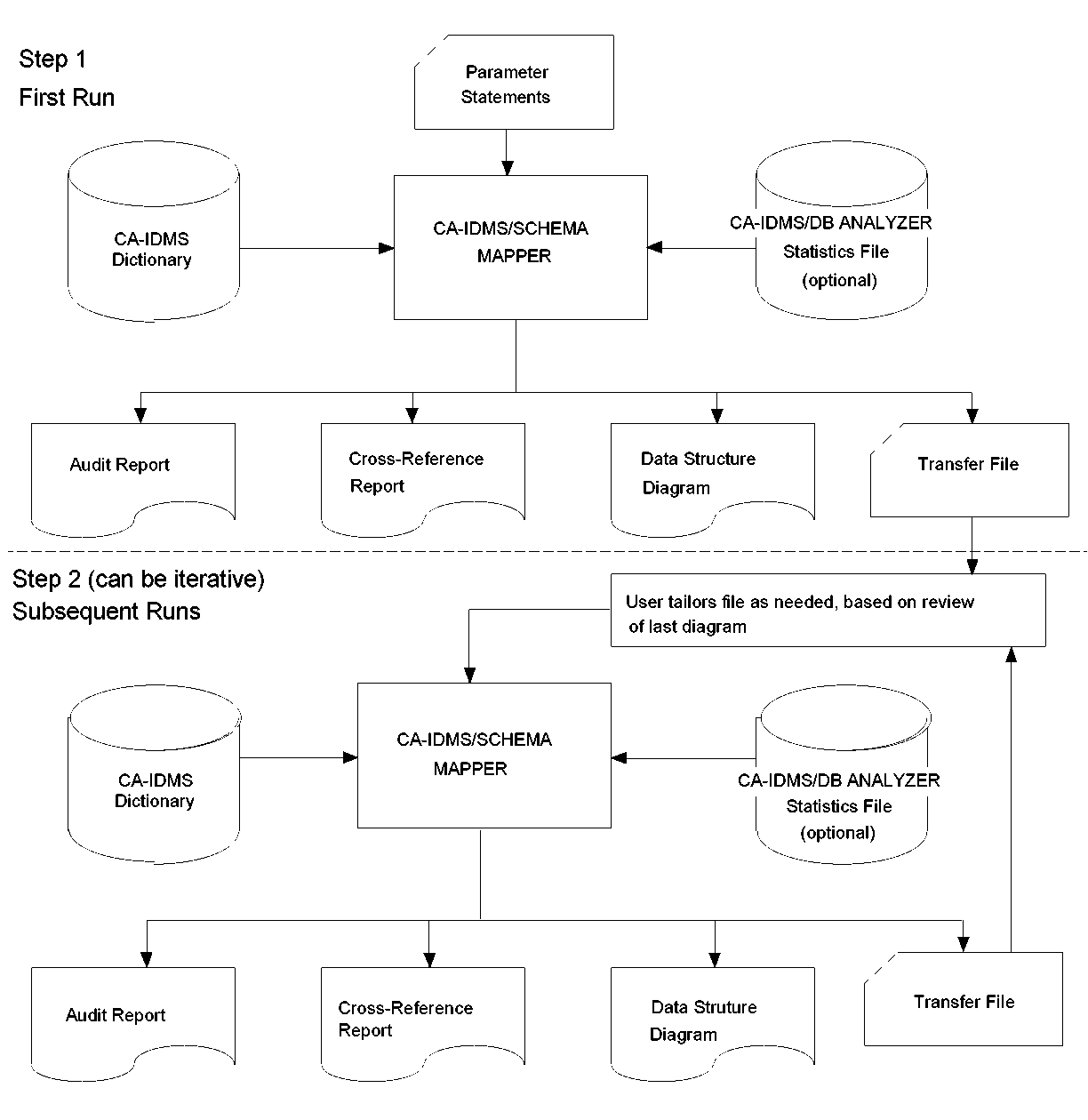 Exhibit 1.4: Creating and Tailoring the CA IDMS Schema Mapper Data Structure Diagram
|
Copyright © 2013 CA.
All rights reserved.
|
|