

Data structure diagrams are typically large, so the printed output spans multiple pages. CA IDMS Schema Mapper automatically divides the overall diagram into pieces that are the size of your printer's paper, with each piece being the size of a page. You assemble the pages in columns down the length of the diagram and rows across the width of the diagram. (See Exhibit 3.2)
The diagram is printed sequentially, one column of pages after another, beginning with the column that runs down the left side of the diagram (column A). CA IDMS Schema Mapper automatically generates column headers at the top of each column to help you find the beginning of the printout for each column. Your printer will put a blank page after the last page of each column. This blank page helps eliminate wallpapering problems if your diagram does not begin printing right at the top of a page.
A unique two-character (alphabetic) page identifier is also automatically printed, in the upper right corner of each page. The first character identifies the page's column in the overall diagram, and the second character identifies its row in the overall diagram. The first page of the diagram (the top left corner) is in the first column, and the first row and is identified by the characters AA.
To assemble the data structure diagram:
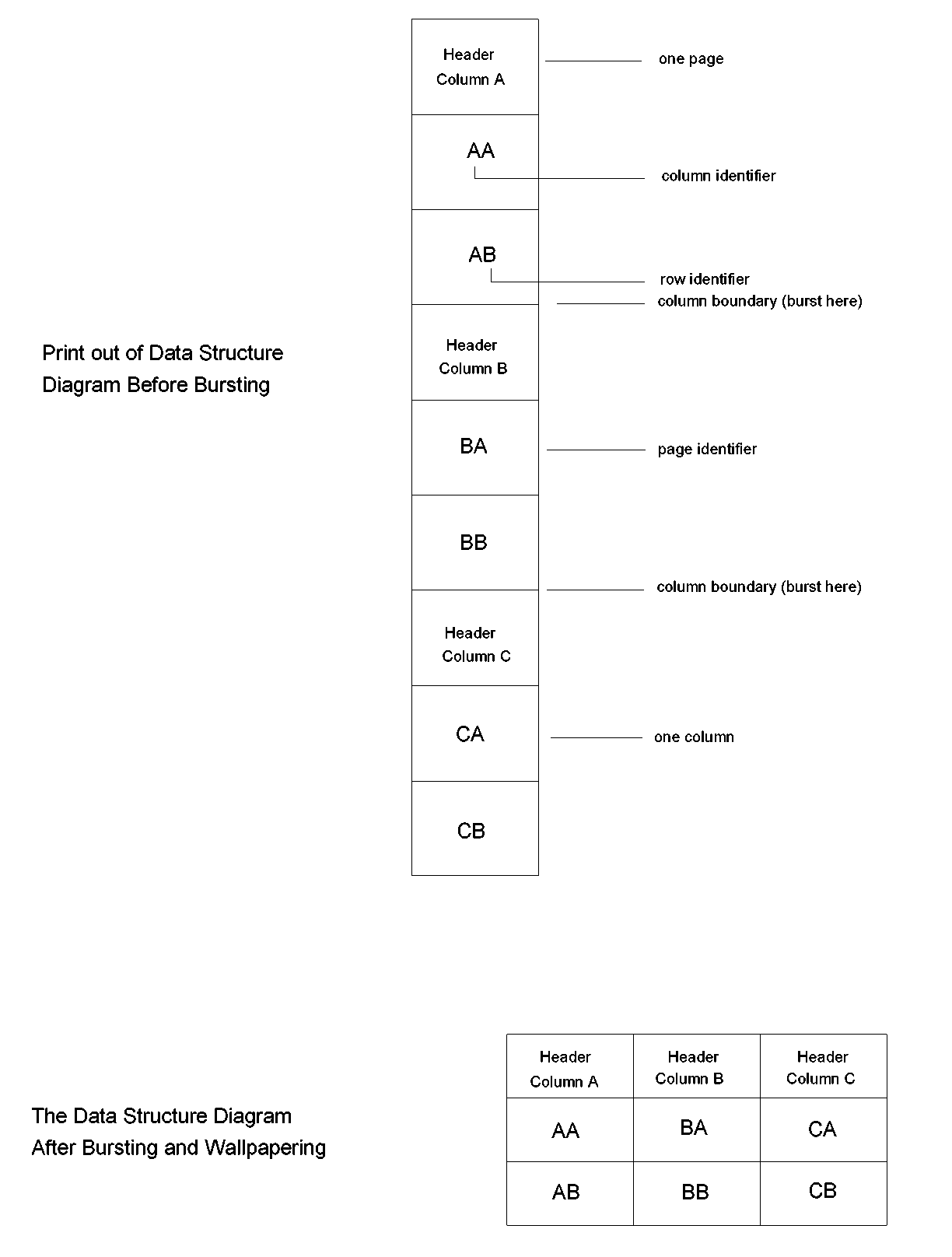
Exhibit 3.2: Wallpapering the CA IDMS Schema Mapper Data Structure Diagram
|
Copyright © 2013 CA.
All rights reserved.
|
|