

In this example, you execute a qfile to create a report.
Executing a Qfile:
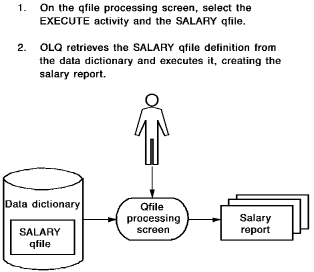
Start on the Qfile Processing screen. To get there, type qfile in the top line of any screen.
Select Execute. Name the SALARY qfile.
      CA OLQ Release nn.n                          *** QFILE Processing ***
  ->                                                       Page     1 of     1
                                                                     leted
 140000 Select function and press the ENTER key
  User: SYB
  Dictionary name: TSTDICT                      Dictionary node:

  Function:    x Execute       _ Create         _ Replace       _ Delete
               _ Execute with new criteria      _ List          _ Edit
               _ Execute batch

  Routine name:                                   Version:
  Comments:

  SELECT ROUTINE                   VERSION  COMMENTS
  _  DEPARTMENT                          1
  _  MANAGERS                            1
  _  NEW EMPLOYEES                       1
  _  SALARY GRADE                        1 SALARY SUMMARY COMPUTATIONS
  x  SALARY                              1 EXAMPLE


  1=HELP                 3=QUIT                 4=MESSAGE                 6=MENU
Specify Yes to continue data retrieval.
    CA OLQ Release nn.n                         *** Retrieval Interrupted ***
 ->
092018 The default DICTNAME value has been modified.
092027 Underline character has been modified to -
         Retrieval interrupted due to excessive data base accesses.


 Number of whole rows. . . . . . . .       54
 Total number of records read. . . .      100
 Total number of records selected. .       99
 Number of data errors . . . . . . .        0


         Continue execution     x Yes
                                X No


         Current interrupt interval is     100 data base accesses.


 1=HELP                            3=QUIT                            4=MESSAGE
Depending on how high the interrupt count at your site is set, CA OLQ may bypass the Retrieval Interrupted screen and proceed directly to the Retrieval Completed screen.
     CA OLQ Release nn.n                         *** Retrieval Completed ***
 ->
105022 Sort successfully completed.  68 records in.  68 records out.
092021 Execution has completed for q-file: SALARY

 Number of whole rows. . . . . . . .       68
 Total number of records read. . . .      125
 Total number of records selected. .      124
 Number of data errors . . . . . . .        0

     Select                                                 Command/
     Option     ---> Display/Format Activity <---          Screen Name

       X        Display report                             DISplay
       _        Save report                                SAVe
       _        Choose the sort sequence of report         SORt
       _        Change column headers                      HEAder
       _        Change page header and footer              PAGe HEAder
       _        Change display format of data ($,commas)   PICture
       _        Format columns (Alignment, sparse)         EDIt
       _        Specify summary computations (Totals)      GROup BY
       _        Send the report to a printer               PRInt

 1=HELP                 3=QUIT                 4=MESSAGE                 6=MENU
     CA OLQ Release nn.n                              *** Display Report ***
 ->                                                       Page     1 Line     1
125000 Press the ENTER key to go to the next page of the report.

                           EMPLOYEE/EMPOSITION REPORT
                                    mm/dd/yy

   FIRST         LAST                                  SAL.          BONUS
   NAME          NAME       START       GRADE         AMOUNT           %
 ────────── ─────────────── ───── ── ── ───── ────────────────────── ─────
 TOM        FITZHUGH           09 19 81    11               13000.00  .004
 NANCY      TERNER             05 26 82    11               13000.00  .004
 CYNTHIA    JOHNSON            03 23 77    11               13500.00  .004
                                                         ───────────
                                              AVE FOR 11:   13166.66

 ROBIN      GARDNER            06 15 81    12               14000.00  .004
 BRIAN      NICEMAN            05 06 80    12               14000.00  .004
 DORIS      KING               08 16 80    12               14500.00  .004
 SANDY      KRAAMER            04 04 81    12               14000.00  .004


                                      - 1 -
 1=HELP     3=QUIT     4=MESSAGE     6=MENU     8=FWD     10=LEFT     11=RIGHT
|
Copyright © 2013 CA.
All rights reserved.
|
|