

The software components that make up the operational CA Endevor/DB system include:
The first two components -- the Change Monitor and the Security Access Subsystem -- operate during IDD update processing, to control and record changes made to the IDD.
The figure below illustrates how these components work:
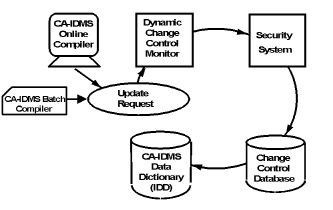
In addition to operating during IDD update processing, the Security Access Subsystem is used by project managers to define and view IDD access-control information (who can access what entities, and under which CCIDs, for example). These functions of the subsystem are discussed in the CA Endevor/DB for CA IDMS Administrator Guide.
The third CA Endevor/DB component, the Management Facility, is used by project managers to define and view information in the CCDB that is useful in monitoring project workflow and programmer productivity. The Batch Management Facility supports management of CCDB definitions through use of free-form, English-like commands. Refer to the CA Endevor/DB for CA IDMS Batch Reference Guide for information on the Batch Management Facility. The Online Management Facility, covered by this document, supports the management of CCDB definitions and provides the ability to browse the history of changes made to the IDD. Appendix C, "Online/Batch Counterparts" contains a table describing the functions available in the Online Management Facility and their equivalent Batch Management Facility commands.
The final CA Endevor/DB component, the Promotion Support Utilities, in conjunction with the Dynamic Change Monitor and the CCDB, gives CA Endevor/DB the unique capability to assure accurate promotions while eliminating a majority of the time-consuming tasks normally associated with migration. CA Endevor/DB facilities can be used to perform all migration tasks or to interface with an existing migrator in use at an installation. For more information, refer to the CA Endevor/DB for CA IDMS Administrator Guide.
|
Copyright © 2013 CA.
All rights reserved.
|
|