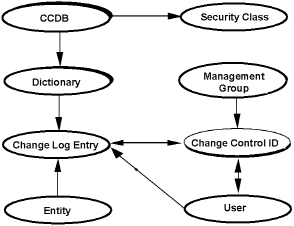
The controlling component of CA Endevor/DB is the Change Control Database (CCDB). The CCDB contains information as follows:
- Dictionary information identifies the CA IDMS Integrated Data Dictionary (IDD) that corresponds to the CCDB. There is a separate CCDB for each IDD.
- Change Log Entries (CLEs) document every change made to the IDD (or to the CCDB itself). Each CLE is associated in the CCDB with a "descriptor" for the entity that was changed, and the user responsible for the change. If a change was made under a particular Change Control Identifier (CCID), the CLE is associated with that CCID as well. CLEs are identified by the date and time of the change, and the type of action recorded by the change (ADD, MODIFY, or DELETE entity, for example).
- Change Control Identifiers (CCIDs) categorize CCDB information for control and reporting purposes. The use of CCIDs is optional. You might have one CCID for each project, for example, or within each project, a separate CCID for design activities, detailed specification activities, implementation activities, and so forth.
Typically, a project manager establishes CCIDs before work begins for a project so that CA Endevor/DB can relate each entity update to the appropriate CCID(s). This allows the system to assign the correct CCID(s) automatically, as necessary, and gives the project manager the ability to control user access to the system by CCID. However, it is not a system requirement that CCID(s) be predefined for a project. CCIDs can also be manually established for existing CLEs.
There are two methods by which CCIDs can automatically be assigned to a CLE.
- One method is to sign on to CA Endevor/DB under a CCID. Each user signs on to CA Endevor/DB under one or more CCIDs. All work performed during the session is logged to the Signon CCID(s). Optionally, individual entities can be Signed out to a particular CCID, so that modification against that entity can only occur within the context of the CCID.
- The second method is by Derived CCIDs. In some shops, it may be unfeasible to require that all users sign on to CA Endevor/DB each time they switch from one CCID to another. For example, if a unique CCID is established for every change for every DIALOG, programmers would be issuing CA Endevor/DB signons on a frequent basis. To circumvent this problem, the CCDB Administrator can predefine the relationships between CCIDs and dictionary entities, and the programmers can run in "DERIVED CCID" mode. When doing so, they only signon to CA Endevor/DB to specify their userid. The CCID to which a given change is attributed will be determined by the presence of a PREAUTHORIZATION junction. This processing mode is specified through the SECURITY-CLASS record.
- Management groups classify CCIDs for reporting purposes. A single management group might include all CCIDs for a particular project, for example, or for several related projects.
- User information describes individual users -- or user groups -- to the system. For each user, the system stores a name, password (optional), security restrictions, and descriptive comments. The name and password are used during Signon, to identify the user to the system and to verify that the user is authorized to use the system. The security class identifies the set of security restrictions in effect for the user (further described in the CA Endevor/DB for CA IDMS Administrator Guide.
If you are using Signon CCIDs, the system also stores a list of CCIDs under which each user is working (or under which the user last worked). These Signon CCID(s) stay in effect for a given dictionary until they are changed or until you signon with a different CCID(s). If you are using the Derived CCID option for the user, CCIDs are dynamically assigned and Signon CCIDs are not used.
If necessary, a particular user might be restricted from dictionary access altogether. This can effectively secure your database against tampering by persons no longer permitted access.
- Entity information describes the entities for which CLEs have been written. A record, known as an "entity descriptor," is recorded in the CCDB automatically for each entity that is updated. For any given entity, the descriptor identification (entity name, type, and version) is identical to that for the entity itself.
If necessary, you can set up an entity descriptor for an entity for which CLEs have not yet been written, in anticipation of subsequent change or in preparation to preauthorize a user or CCID to access that entity.
- Status identifiers may be associated with an entity or with an entity within the context of a particular CCID. Each entity or entity/CCID combination can have only one status associated with it at any given time. Status names are user-defined and might identify a system component as "Designed," "In Development," "Completed," "Programmed," "Tested," and so forth. Each status name is unique on the CCDB but may be associated with (assigned to) any number of entities or entity/CCID combinations.
For example, you might have a status named "Testing" that would be assigned to every entity in the testing phase of development, across all CCIDs and management groups in the CCDB.
- Security classes control whether each user, CCID, or dictionary is allowed access to various system facilities. Security classes might restrict a user from access to a particular subfunction option or a particular entity, for example, or might specify that the user can (or cannot) work without Signing on under a CCID. Refer to the CA Endevor/DB for CA IDMS Administrator Guide for more information about security classes and other security considerations.
- Preauthorization - Users can be restricted from processing under a particular CCID(s). They can also be "preauthorized" to use a particular CCID, ensuring that the user -- and only the user -- can process under that CCID. Similarly, entities might be restricted from access under a particular CCID(s). An entity might also be preauthorized for use with a particular CCID(s) -- or only by a particular user signed on under a specific CCID.
Preauthorizations may be used in any or all of five places:
- For specific entities - to set restrictions so that only preauthorized users may change them.
- For specific users - to restrict which entities they are allowed to change.
- To control which users are allowed to signon to CA Endevor/DB or to make changes under given CCIDs.
- To control which users are allowed to establish entity-status relationships for certain statuses. These relationships are used to control the promotion process.
- To predefine the CCID to which changes will be attributed for certain entities.
The diagram below shows how the various types of CCDB information interrelate. The CCDB record in the upper left simply identifies the CCDB and is not described with the CCDB components above.