

This section contains the following topics:
Additional Tasks Performed by CA IDMS Dictionary Migrator
How CA IDMS Dictionary Migrator Operates
Running as a Single Job Execution Under Central Version
Running as a Two-Job Execution
This chapter discusses CA IDMS Dictionary Migrator operations. It provides operational considerations, information about allocating space for the work and syntax files, how the files are used, system flow, and additional features.
Before and during the execution of CA IDMS Dictionary Migrator there are some important operational factors to consider:
The following considerations must be taken into account for local mode processing:
Note: For more information about the necessary parameters, see the CA IDMS Common Facilities Guide. Do not, however, use Dictname, Nodename, Dbname or Dictnode parameter in the SYSIDMS file.
Although CA IDMS Dictionary Migrator's primary function is to transfer systems from testing to production, it can also be used for these dictionary analysis and maintenance tasks:
CA IDMS Dictionary Migrator is a parameter-driven process that uses work and syntax files. The work files are used as temporary storage for dictionary entities as they are extracted from the source dictionary, sorted, compared to the object dictionary, and retained for reports and syntax generation. CA IDMS Dictionary Migrator then produces the syntax statements for entities that are to be transferred to the object dictionary and stores these statements on syntax files. The syntax files are processed by CA IDMS utilities and compilers and the CA IDMS utilities provided with CA IDMS Dictionary Migrator to populate the object dictionary.
Extracting and comparing entities, and producing syntax does not update the object dictionary. Updating the object dictionary occurs during the final upload step, using the CA IDMS utilities and compilers and the Computer Associates utility provided with CA IDMS Dictionary Migrator.
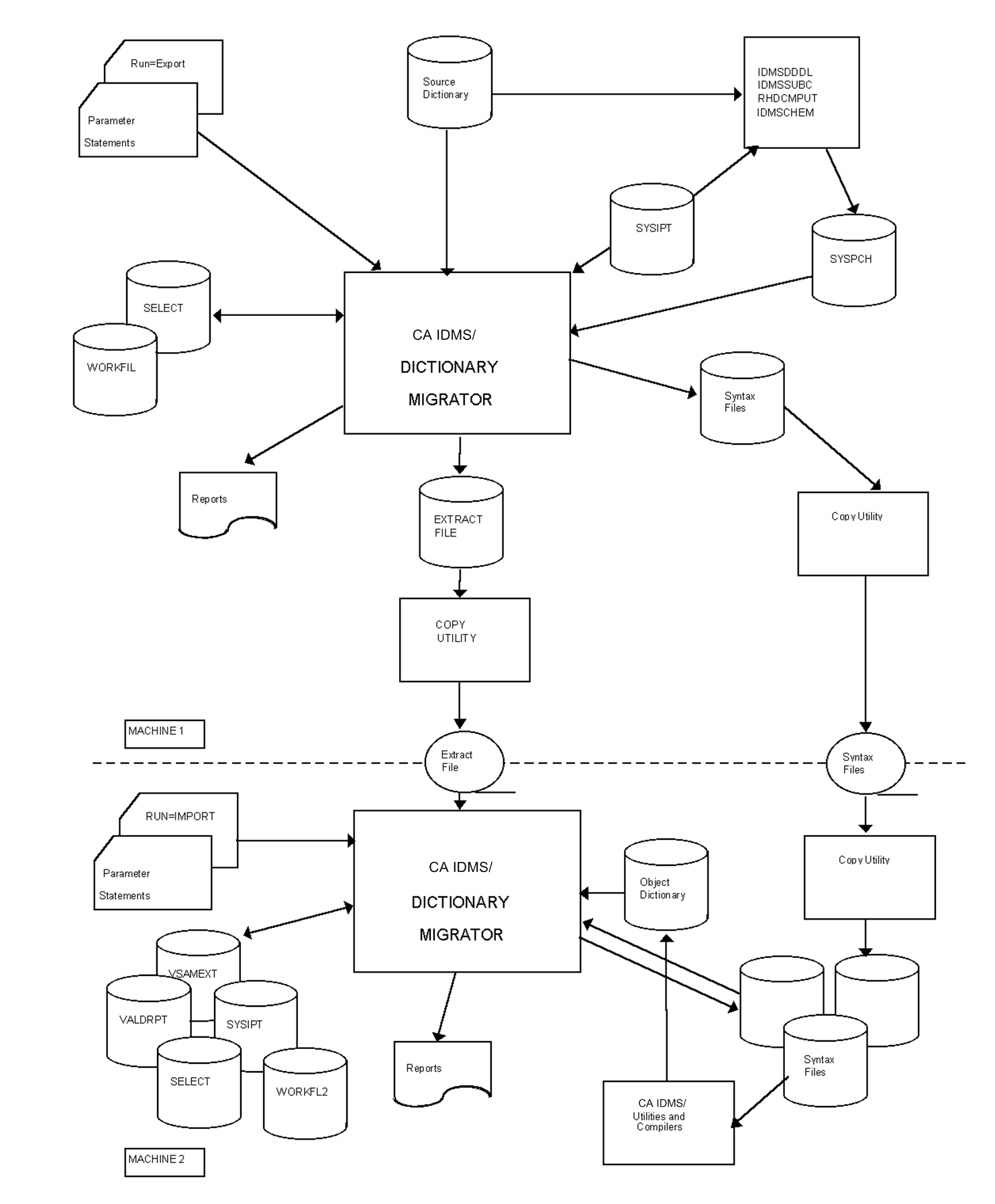
There are two methods of operating CA IDMS Dictionary Migrator--as a single job execution or as a two-job execution. A single execution (see the following diagram) is used when the source and object dictionaries exist in the same CPU or when the dictionaries exist in CPUs that can be accessed by node communication. A two-job execution (EXPORT/IMPORT) is used when CA IDMS Dictionary Migrator is processed in one CPU and the object dictionary exists in another CPU without node communication (see the next diagram).
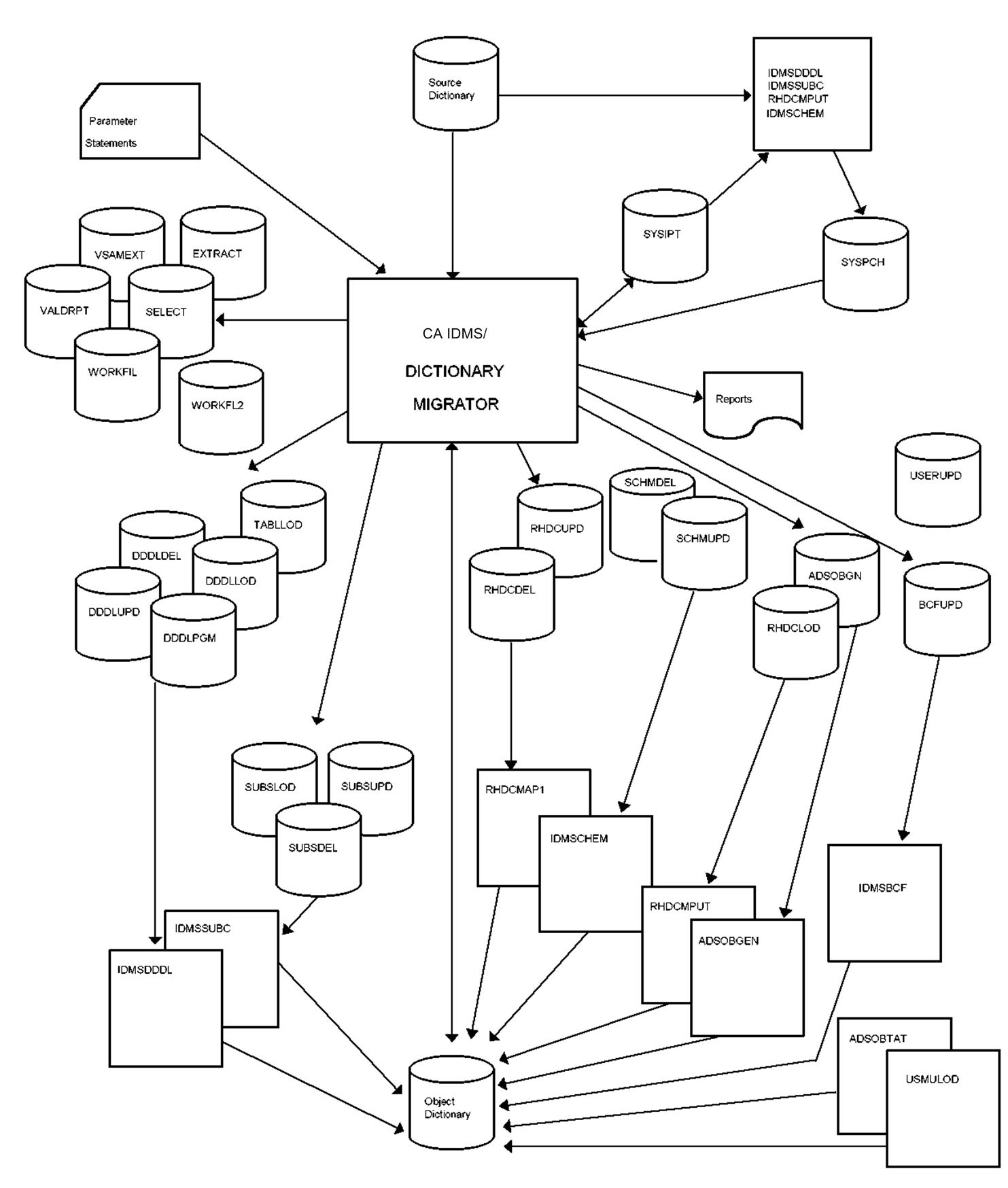
CA IDMS Dictionary Migrator requires space allocations for as many as eight work files and sixteen syntax files. One of the work files-- VSAMEXT--must be a VSAM file. In addition to allocating space for the work and syntax files, the actual run of CA IDMS Dictionary Migrator requires you to allocate adequate space for sort-work files.
The first of the following tables describes each work file and suggests space allocations.
The second table provides the following information about syntax files:
The actual number of tracks for the work and syntax files varies depending on the size of the system being migrated, and upon the device types assigned. You may need to adjust the numbers listed in the following two tables.
The block size of work files and syntax files can be changed by using the DCB parameter of the DD statement. The LRECL (logical record length) of each work file is listed in the first of the following tables. The LRECL of each syntax file used by the CA IDMS utility provided with CA IDMS Dictionary Migrator or CA IDMS utility or compiler is 80.
An ASSIGN statement is required for every work and syntax file processed by CA IDMS Dictionary Migrator. This assignment is necessary because CA IDMS Dictionary Migrator has its own device-independent support that dynamically builds a DTF based on the device type indicated by the assignment of the logical unit. The logical unit required for each work and syntax file is provided in the following two tables.
Occasionally, you may receive the message "FILE ASSIGNED to SYSnnn IS NOT VSAM." This means that the data set is processed SAM instead of VSAM because CA IDMS Dictionary Migrator was unable to find the data set in the VSAM catalog. SYS016, however, must be a VSAM file.
|
File Name (z/VSE Logical Unit) |
Required |
Type |
LRECL |
Suggested Space |
Description |
|---|---|---|---|---|---|
|
MIGPARM |
yes |
disk tape card |
80 |
1,1 |
z/OS and z/VM--Input file for CA IDMS Dictionary Migrator parameter statement |
|
SYS011 |
yes |
disk tape card |
80 |
1,1 |
z/VSE only--Input file for CA IDMS Dictionary Migrator parameter statements |
|
SYSIPT (SYS012) |
yes |
disk |
80 |
30,60 |
Input to CA IDMS IDMSDDDL, IDMSSUBC, RHDCMPUT, and IDMSCHEM utilities |
|
SYSDPC (SYS018) |
yes |
disk |
80 |
150,60 |
Output from IDMSDDDL, IDMSSUBC, RHDCMPUT, and IDMSCHEM utilities |
|
SELECT (SYS014) |
** |
disk |
176 |
2,1 |
Contains encoded extract statements |
|
EXTRACT |
yes |
disk |
228 |
150,60 |
Contains entities from source dictionary as they are extracted |
|
VSAMEXT |
** |
VSAM KSDS |
228 |
60,30 |
Contains extracted entities for dictionary comparisons |
|
VALDRPT |
** |
disk |
138 |
5,2 |
Sorts and controls information from dictionary comparisons for reports |
|
WORKFIL |
** |
disk |
80 |
60,30 |
Temporary holding file for syntax-creation or modification |
|
WORKFL2 (SYS034) |
** |
disk |
228 |
60,30 |
Required to construct combination file for entities extracted from the object dictionary |
|
SYSCTL |
*** |
disk |
20 |
pre- allocated share |
Defines access to the central version which will be the gateway CV if a node is specified. |
|
SYSIDMS |
*** |
card disk |
80 |
pre- allocated share |
See the DBA Reference. Never specify DBNAME, NODENAME, DICTNODE, or DICTNAME. Use DMCL=dmclname, LOCAL=ON, and JOURNAL=OFF to run local (minicv) mode. |
*Track Allocation expressed for 3350 disk device (30 tracks = 1 cylinder).
**File requirement depends on the run type.
***File requirement depends on environment.
Exhibit 5.2: Work Files Table
|
Step Order |
Syntax File (z/VSE logical unit) |
Suggested Space |
CA IDMS Utility or Compiler |
Region Size |
Step Function |
|---|---|---|---|---|---|
|
1 |
RHDCDEL (SYS019) |
5,2 |
RHDCMAP1 |
4000K |
Panel and map deletion. |
|
2 |
SCHMDEL (SYS020) |
5,2 |
IDMSCHEM |
3000K |
Schema and subschema source deletion. |
|
3 |
SUBSDEL (SYS021) |
5,2 |
IDMSSUBSC |
2500K |
Subschema source deletion. This step is not necessary if you deleted the schema. |
|
4 |
DDDLDEL (SYS022) |
5,2 |
IDMSDDDL |
3000K |
Element, record, table deletion. |
|
5 |
DDDLUPD (SYS023) |
60,30 |
IDMSDDDL |
3000K |
ADD/MODIFY for elements, records, messages, modules, class, tables, attribute, and system. |
|
6 |
BCFUPD (SYS040) |
5,2 |
IDMSBCF |
1024K |
Create statements for tables, views, and SQL schemas. |
|
7 |
TABLLOD (SYS024) |
5,2 |
IDMSDDDL |
3000K |
MODIFY for tables. Generates table load modules in the DDLCOD area. |
|
8 |
DDDLLOD (SYS025) |
5,2 |
IDMSDDDL |
3000K |
ADD/Modify of load modules for subschemas, maps, map editing tables, and dialog processes. |
|
9 |
SCHMUPD (SYS026) |
5,2 |
IDMSCHEM |
2500K |
Upload of schema modifications — source statements written in schema DDL and any data copied from the dictionary to add schemas. |
|
10 |
SUBSUPD (SYS028) |
5,2 |
IDMSSUBSC |
2500K |
Upload of subschemas. |
|
11 |
SUBSLOD (SYS029) |
5,2 |
IDMSSUBSC |
2500K |
Generates subschema load modules in DDLDCLOD area. |
|
12 |
RHDCUPD (SYS030) |
5,2 |
RHDCMAP |
4000K |
ADD/MODIFY of panels and maps. |
|
13 |
RHDCLOD (SYS031) |
60,30 |
RHDCMPUT |
4000K |
Compiles maps and stores map load modules in DDLDCLOD area. |
|
14 |
ADSOBGN (SYS032) |
1,2 |
ADSOBCOM |
5000K |
Generates dialogs. This step can only be executed if dialog load modules were migrated. |
|
15 |
DDDLPGM (SYS033) |
5,2 |
IDMSDDDL |
3000K |
ADD/MODIFY of program statements. |
|
16 |
ADSBTAT (SYS037) |
1,1 |
ADSOBTAT |
3000K |
Updates Task Application Table (revised ADSA applications only). |
|
17 |
USERUPD (SYS038) |
1,1 |
USMULOD |
3000K |
Updates passwords on migrated user records to reflect source database. |
*Track allocation expressed for 3350 disk device (30 tracks = 1 cylinder).
Executing CA IDMS Dictionary Migrator as a single job means that you are performing a migration between two dictionaries that exist on the same machine or two machines that have node communication. You use the PARMCHECK, VERIFY, MIGRATE, or AUDIT option in the RUN parameter for a single execution.
The following pages present a description of the activities for a single job execution of CA IDMS Dictionary Migrator. The complete JCL and key appear in the JCL members that were downloaded from your installation media. The JCL for a single execution perform the following migration activities:
The JCL model contained in the distribution SAMPJCL library member USMVSAM (z/OS), TOOLJCL library member USMVSAM.S (z/VSE), or the USMVSAM EXEC (z/VM), allocates the VSAM work file. The key to the JCL is also contained in USMVSAM.
The JCL model contained in the distribution SAMPJCL library member USMSYNTX (z/OS only) allocates the syntax files. The key to the model JCL is also contained in USMSYNTX. In a z/VSE or z/VM environment, the syntax files are allocated as part of the USMXTRCT step.
The JCL model contained in the distribution SAMPJCL library member USMXTRCT (z/OS), TOOLJCL library member USMXTRCT.S (z/VSE), or the USMXTRCT EXEC (z/VM), allocates the work and syntax files (z/VSE only), extracts information from the source dictionary, compares the extract to the object dictionary, reports on the comparison, and produces the syntax files. The key to the model JCL is also contained in USMXTRCT.
The JCL model contained in the distribution SAMPJCL library member USMLOAD1 (z/OS) TOOLJCL library member USMLOAD1.S (z/VSE), or the USMLOAD1 EXEC (z/VM), each show a step for uploading a syntax file to the object dictionary through an CA IDMS utility supplied by Computer Associates. The key to the JCL is also contained in USMLOAD1. There can be from 1 to 16 steps involved in the upload, depending on your site and the type of migration being performed. See the second of the previous tables to determine:
For each step, you must supply values for all the variables shown in the step.
Note: Some utilities are executed more than once. Do not combine syntax files for the same utility. Process the syntax files in the order outlined in the second of the previous tables to correctly populate the object dictionary.
The JCL model contained in the distribution SAMPJCL library member USMLOAD3 (z/OS), TOOLJCL library member USMLOAD3.S (z/VSE), or the UMLOAD3 EXEC (z/VM), is an optional step that, when executed, deletes the migrated source from the source dictionary after migration. The key to the model JCL is also contained in USMLOAD3.
If you want to delete entities from the source dictionary after migration, make a second non-CHANGEONLY run using the same parameters as the real migration, but specifying the same dictionary for both source and object.
If you are using CA IDMS Dictionary Migrator to extract SQL entity definitions from a source catalog, the JCL model contained in the distribution SAMPJCL library member USMSQLOD (z/OS), TOOLJCL library member USMSQLOD.S (z/VSE), or the USMSQLOD EXEC (z/VM), can be used to update your target catalog with the syntax for the extracted SQL entities.
You can use the files created in a VERIFY run as input to CREATESYNTAX run. As a result, you can create syntax files using the data that already has produced the migration reports.
The JCL model contained in the distribution SAMPJCL library member USMIMPRT (z/OS), executes the CREATESYNTAX step.
CREATESYNTAX is useful when the VERIFY run does not show errors that require correcting. Therefore, the CREATESYNTAX run begins where the VERIFY run stops.
To perform a migration between two machines that do not share node communication, you must run CA IDMS Dictionary Migrator twice (in two jobs) using the EXPORT/IMPORT options in the RUN parameter. The following flowchart illustrates the system flow of a two-job execution for z/OS and z/VSE.
During the first job -- EXPORT -- CA IDMS Dictionary Migrator extracts information from a source dictionary in one machine and produces syntax, and USMCOPY stores the information and syntax on tape.
During the second job -- IMPORT-- CA IDMS Dictionary Migrator compares the source dictionary information on tape to the object dictionary in another machine and produces detailed reports of the analysis.
The CA IDMS utilities and the CA IDMS utilities supplied with CA IDMS Dictionary Migrator then upload the syntax files to the object dictionary.
The following pages present a description of the activities for a two-job execution of CA IDMS Dictionary Migrator. The complete JCL and keys are contained in the JCL members that were downloaded from your installation media. A two-job execution performs the migration activities listed below.
The JCL model contained in the distribution SAMPJCL library member USMSYNTX (z/OS) allocates the syntax files. The key to the model JCL is also contained in USMSYNTX. In a z/VSE environment, the syntax files are allocated as part of the USMEXPRT step.
The JCL model contained in the distribution SAMPJCL library member USMEXPRT (z/OS), TOOLJCL library member USMEXPRT.S (z/VSE), or the USMEXPRT EXEC (z/VM), allocates the syntax files (z/VSE only), allocates the work files, extracts information from the source dictionary and puts it onto disk, and produces syntax files on disk. The key to the model JCL is also contained in USMEXPRT.
Use a copy utility to copy the extract file and all syntax files onto a medium that can be transported to the target machine. Model z/OS JCL that performs this action and places all files on one tape can be found in source library member USMCOPY (z/OS). The key to the model JCL is contained in USMCOPY.
Use the same copy utility used in Step 3 to copy the transported files onto disk on the target machine.
The JCL model contained in the distribution SAMPJCL library member USMVSAM (z/OS), TOOLJCL library member USMVSAM.S (z/VSE), or the USMVSAM EXEC (z/VM), allocates the VSAM work file. The key to the model JCL is also contained in USMVSAM.
The JCL model contained in the distribution SAMPJCL library member USMIMPRT (z/OS), TOOLJCL library member USMIMPRT.S (z/VSE), or the UMIMPRT EXEC (z/VM), imports the extract tape, compares extract to object dictionary, and reports on the comparison. The key to the model JCL is also contained in USMIMPRT.
The JCL model contained in the distribution SAMPJCL library member USMLOAD1 (z/OS), TOOLJCL library member USMLOAD1.S (z/VSE), or the USMLOAD1 EXEC (z/VM), is a step for uploading a syntax file to the object dictionary through an CA IDMS utility or through the CA ADSA application upload utility supplied by Computer Associates with CA IDMS Dictionary Migrator. The key to the model JCL is also contained in USMLOAD1. There can be from 1 to 16 steps involved in the upload, depending on your site, the type of migration being performed, and whether you want to delete the migrated syntax from the source dictionary.
See the previous table to determine:
For each step, you must supply values for all the variables shown in the step.
Note: Some utilities are executed more than once. Do not combine syntax files for the same utility. Process the syntax files in the order outlined in Exhibit 5.3 to correctly populate the object dictionary.
The JCL model contained in the distribution SAMPJCL library member USMLOAD3 (z/OS), TOOLJCL library member USMLOAD3.S (z/VSE), or the USMLOAD3 EXEC (z/VM), deletes the migrated entities from the source dictionary after migration. The key to the model JCL is also contained in USMLOAD3. This step is optional. If you want to delete entities from the source dictionary after migration, make a second non-CHANGEONLY run using the same parameters as the real migration, but specifying the same dictionary for both source and object.
If you are using CA IDMS Dictionary Migrator to extract SQL entity definitions from a source catalog, the JCL model contained in the distribution SAMPJCL library member USMSQLOD (z/OS), TOOLJCL library member USMSQLOD.S (z/VSE), or the USMSQLOD EXEC (z/VM), can be used to update your target catalog with the syntax for the extracted SQL entities.
|
Copyright © 2014 CA.
All rights reserved.
|
|