

This section contains the following topics:
When to Use CA IDMS Dictionary Migrator
Migrate Systems Quickly and Accurately
Take the Guesswork Out of Migration
CA IDMS Dictionary Migrator Is Easy to Use
Flexible Processing Capabilities
Improve Development Productivity
Configure the Migration to Meet Your Needs
Online Aid for Selecting Parameters
Choose Parameters for Migration
Use DMA to Set up a Migration Easily
Menu-Driven Parameter Selection
CA IDMS Dictionary Migrator is the CA system migration tool for transferring systems from a testing environment to a production environment. CA IDMS Dictionary Migrator Assistant (DMA) is an online tool that assists you in selecting parameters to supply to CA IDMS Dictionary Migrator. This chapter introduces CA IDMS Dictionary Migrator and DMA's features and capabilities. It also explains how CA IDMS Dictionary Migrator can be used during system development and for dictionary maintenance.
The steps for performing a migration are as follows:
Note: The information that is migrated becomes executable when the Clist is invoked or the central version is cycled.
Migration is the transfer of a set of related entities stored in a dictionary to another dictionary. A successful migration ensures that all migrated entities function in the new environment producing results similar to those in the old environment and that no entities in the new dictionary outside of the set of migrated entities are materially affected by the migration.
Use CA IDMS Dictionary Migrator whenever you need to transfer information from one dictionary to another. This chapter will further explain performing migration.
To configure the migration you can migrate by PROGRAM and DIALOG. PROGRAM indicates that the specified program is to extracted with its related entities. DIALOG indicates that the specified dialog is to be extracted with its related entities.
CA IDMS Dictionary Migrator is a powerful and comprehensive tool for transferring complete systems or portions of systems from one dictionary to another.
CA IDMS Dictionary Migrator eliminates the time-consuming tasks of researching and listing every component of a system and of manually producing extensive syntax to migrate a system. CA IDMS Dictionary Migrator does the work automatically. You can move systems into production quickly, as well as accurately reflect their testing environments.
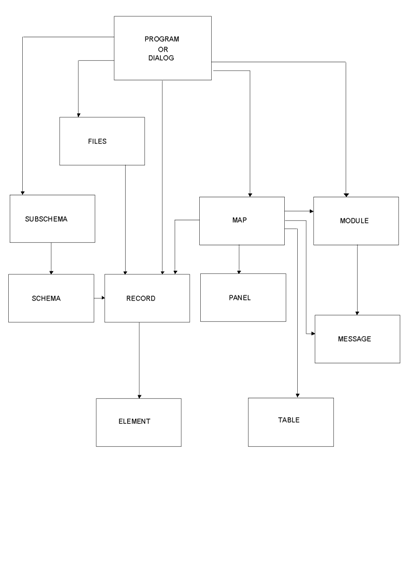
CA IDMS Dictionary Migrator is especially effective in a CA ADS environment. CA IDMS Dictionary Migrator copies from the dictionary, the source, and load modules that store all CA ADS entities records, elements, files, dialogs, messages, tables, schemas, subschemas, maps, and panels during development and transfers them to the production environment. See the first graphic.
CA IDMS Dictionary Migrator takes the guesswork out of migration and puts you in complete control with its easy-to-use parameters and comprehensive reports. CA IDMS Dictionary Migrator gives you a thorough review of every component in a system, compares the testing environment to the production environment, and then migrates the data.
With CA IDMS Dictionary Migrator, moving systems from testing into production, you can accurately plan resources for the final stages of development. The efficiency of CA IDMS Dictionary Migrator and the accuracy of its results let you free resources for other projects by meeting deadlines on current projects.
CA IDMS Dictionary Migrator also supports the transferring of dictionary entities to and from intermediate staging, or QA, or integration dictionaries.
Migrating a system requires extracting its components from source dictionaries and transferring them to an object dictionary. CA IDMS Dictionary Migrator performs the processing automatically. The second graphic illustrates CA IDMS Dictionary Migrator processes.
You can direct and control this process easily with CA IDMS Dictionary Migrator's parameters. Parameters give you the flexibility to perform simple or complex migration.
For a simple migration you need to specify the source and object dictionaries and the system that is going to be migrated. For a more complex migration, select from many optional parameters that set up criteria and tailor the process to meet your needs.
CA IDMS Dictionary Migrator's processing capabilities are flexible. Parameters allow you to migrate:
You can direct the migration process to:
In addition, CA IDMS Dictionary Migrator allows you to review dictionary contents before and after a migration and to use the dictionary sign-on security.
Variations of the migration process are nearly unlimited with CA IDMS Dictionary Migrator. The parameters give you the freedom to configure a migration that is tailored to your system requirements and dictionary standards.
CA IDMS Dictionary Migrator allows you to extract definitions of logical SQL entities from a source catalog and create a syntax file containing these definitions for subsequent upload to a target catalog. Support for the following SQL entity types is included:
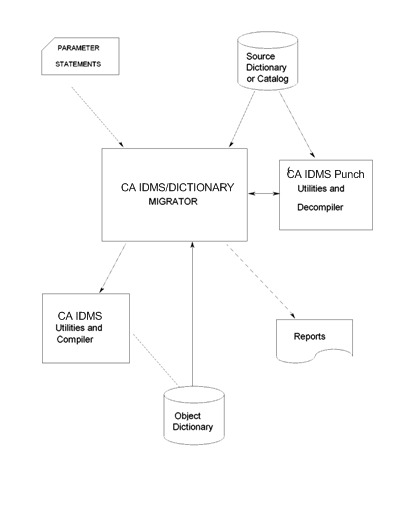
With CA IDMS Dictionary Migrator you can improve productivity in both new applications development and existing applications maintenance by moving systems quickly and accurately from dictionary to dictionary.
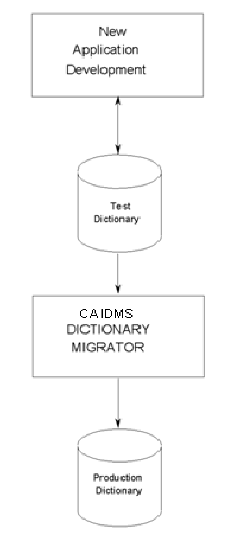
You can use CA IDMS Dictionary Migrator to copy a new application into production. The following graphic illustrates how easily this can be done.
Before the actual transfer to a production environment you can direct CA IDMS Dictionary Migrator to produce reports. From the reports you can review system components and relationships as they exist in the source dictionary and the syntax statements that CA IDMS Dictionary Migrator will provide for the actual migration.
When you have completed your review, you need only run the upload step of the migration you are performing. CA IDMS Dictionary Migrator generates all the syntax necessary for the migration.
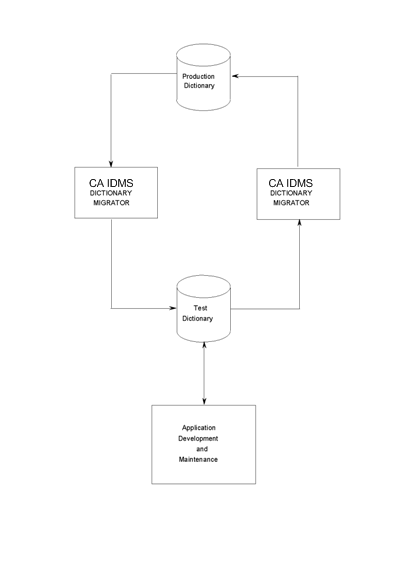
CA IDMS Dictionary Migrator is as useful in an existing applications environment as it is in the new applications environment. CA IDMS Dictionary Migrator allows you to perform testing and maintenance on a system without disturbing its production environment. The following graphic illustrates how you can use CA IDMS Dictionary Migrator for existing applications maintenance.
CA IDMS Dictionary Migrator produces a comprehensive listing of the production system and its components. From the listing you can select the necessary components--source and load modules that store dialogs, messages, tables, schemas, subschemas, maps, and panels, that are moved to the test dictionary.
The components can be assigned to a new version number to keep them distinct from current production entities. This makes it easy to test changes in entity definitions and make system modifications while keeping the production system intact.
When testing is complete, you can examine the reports to compare the system in maintenance to the original production system. Once you've noted the changes, you can migrate the changed portions back to the production version.
By selecting only the modified components, you can significantly reduce the time it takes to copy tested applications back into the production environment. CA IDMS Dictionary Migrator moves the modified system from its test dictionary to the production dictionary accurately and quickly.
CA IDMS Dictionary Migrator can also be used to backup and recovery systems. Before moving a system from one dictionary to another you can back up the system to tape by using USMCOPY. If you discover that the new version is not correct after you have migrated it, you can restore the original system.
Once a system is backed up to tape, you have an excellent way to access an individual system.
CA IDMS Dictionary Migrator offers many options for tailoring a migration to meet your needs. To highlight a few possibilities, you can:
CA IDMS Dictionary Migrator provides you with methods of directing the migration of an entire system. You can direct CA IDMS Dictionary Migrator to trace either organizational structures or program/dialog connections, or migrate an entire ADSA application and all of the dialog programs and their components used in the application. Dictionary relationships are followed with either method to locate every component of the system.
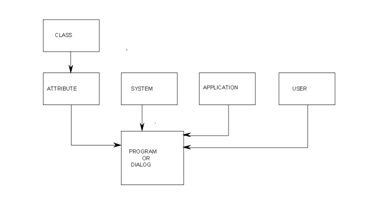
Migrating a system by its organizational structure is especially useful when you have linked all programs to an attribute, a system, a user, a program, or a dialog.
For example, if every dialog of your billing system is linked to the system structure named BILLING, you need only identify how it is organized for a migration. By specifying SYSTEM=BILLING, you can direct CA IDMS Dictionary Migrator to locate every program or dialog associated with the system. CA IDMS Dictionary Migrator will follow dictionary relationships to locate every component used by the billing system's programs or dialogs.
This method provides an efficient way to trace systems that are very large or that have been in development for a long time. For more information see the following flowchart.
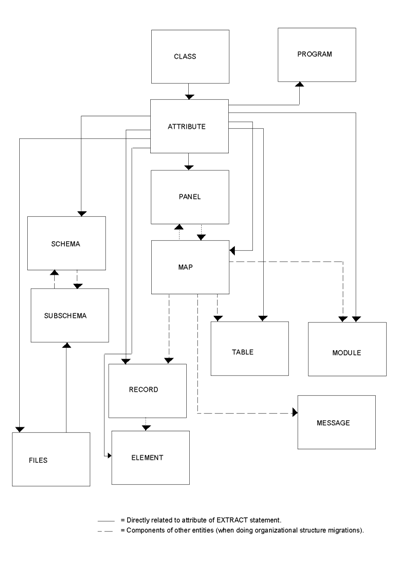
Migrating a system by its organizational structure is especially useful when you have linked an entire system to an attribute.
For example, if every component of your billing system is linked to the ATTRIBUTE structure named BILLING, you need only identify how it is organized for a migration. By specifying ATTRIBUTE=BILLING, and LEVEL=ENTITY, you can direct CA IDMS Dictionary Migrator to locate every entity occurrence associated with the system. CA IDMS Dictionary Migrator follows dictionary relationships to locate every component used by those entity occurrences. For more information see the following flowchart.
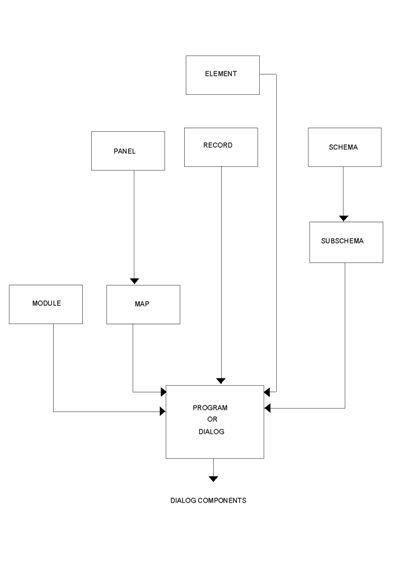
Migrating an entire system by component relationship is useful when you have not linked a system to an organizational structure and are not sure of an entire system's contents. If you specify one of the system components, CA IDMS Dictionary Migrator locates the programs or dialogs that use the component and traces dictionary relationships to extract the entire system.
For example, by specifying a schema name you can direct CA IDMS Dictionary Migrator to locate dialogs that use subschemas related to the specified schema. CA IDMS Dictionary Migrator then extracts the schema, subschemas, dialogs, and all dialog-related modules, maps, panels, tables, records, and elements.
This method can also be used when you change component definitions and need to research the effects of the change on other components within a system before making a complete migration. For more information see the following flowchart.
You can identify a single system component and direct CA IDMS Dictionary Migrator to bypass its program or dialog relationships. CA IDMS Dictionary Migrator locates the component and searches for direct relationships. For example, when you specify a single record, the record is migrated only with its elements.
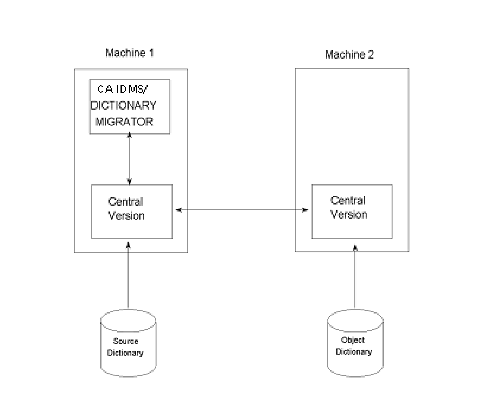
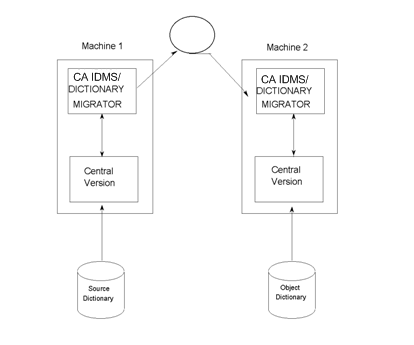
CA IDMS Dictionary Migrator can migrate when the object dictionary is not on the same machine as the source dictionary or Central Version (CV). To access another machine or CV you can use node communication or a two-job execution.
If you have node communication support, you can easily perform a migration in a multiple machine environment with a single-job execution of CA IDMS Dictionary Migrator. You enter parameters that allow you to identify the source and object central version nodes and the source and object dictionary.
The following graphic illustrates the single execution process.
If you do not have node communication support, you can easily process the migration in two jobs.
During the first job, the requested information from the source dictionary CPU is exported and stored on tape.
During the second job, the tape is read and source dictionary information is imported to another CPU and loaded in the object dictionary. Verification, discrepancy and cross-reference reports are also produced in this job. The following graphic illustrates the two-job process.
The two-job execution allows you to communicate between different operating environments. A system developed in a z/VSE environment can be easily transferred to a z/OS environment, and vice versa.
There is an added advantage to using the two-job execution to perform a migration. The two-job execution provides an excellent method of logically backing up a system onto tape.
If you ever have to restore the system, CA IDMS Dictionary Migrator will produce verification reports about the system backed up on tape and the current system in the object dictionary before the system is actually restored.
CA IDMS Dictionary Migrator's flexible processing also allows you to extract system components from several source dictionaries in a single execution. If you are extracting from multiple source dictionaries, and node support is available, and dictionaries can be accessible on any CV, specify all dictionaries and the system component on the EXTRACT statement.
CA IDMS Dictionary Migrator produces nine comprehensive reports that illustrate each activity in its process:
These reports serve as information resources before and after a migration. Each report is illustrated and described in the Reports chapter.
Before the actual migration is executed you can request reports that display the results of CA IDMS Dictionary Migrator's validity and comparative activities. These reports give informative and error messages about parameter statement formats and dictionary contents. The Extract Detail Report can be tailored to list a system and all of its relationships. This is helpful when you are moving large systems from development to production and want a thorough listing of the system.
You can use these reports to preview the contents of a migration and determine if you will be migrating the components you need. The reports can be used to give you the names and locations of additional entities that need to be migrated. You can also use the report information to verify that the system being migrated will not affect other systems.
After a migration CA IDMS Dictionary Migrator's reports are useful for analyzing dictionary contents, documenting entire systems and previous migrations, and planning future migrations. You can use the report information to make decisions about applying and maintaining dictionary standards.
The thoroughness of CA IDMS Dictionary Migrator's reports eliminates the guesswork of performing a migration and ensures that the object dictionary accurately reflects the source dictionary. You can also use CA IDMS Dictionary Migrator's reports to plan the capacity of the object dictionary and to help select the best time to perform a migration.
CA IDMS Dictionary Migrator Assistant (DMA) is an online tool that assists you in selecting parameters to submit to CA IDMS Dictionary Migrator. You provide information about the source dictionary, the target (object) dictionary, and the starting point. DMA converts this information into parameter statements which you can store and submit to CA IDMS Dictionary Migrator. In addition, DMA stores dictionary and starting point values, stores JCL to run CA IDMS Dictionary Migrator, and stores any messages you insert into the JCL.
With DMA, you can:
In a DMA session, from entry to exit, you can define setups for one or more migrations.
A setup is established if you press the ENTER key on the Describe Migration Environment screen. DMA then has enough information to generate a set of parameter statements sufficient for a CA IDMS Dictionary Migrator run.
A setup is also established if you select a parameter file from the list of parmfiles.
Before submitting the parameter statements to CA IDMS Dictionary Migrator, you must store the setup.
DMA, CA IDMS Dictionary Migrator, and you each perform actions essential to the migration process. These distinct actions, described below, combine to permit quick and accurate migrations.
DMA helps you choose parameters to submit to CA IDMS Dictionary Migrator. Optionally it can be used to store parameter statements and submit them to CA IDMS Dictionary Migrator. DMA can also store JCL to run CA IDMS Dictionary Migrator. When the job is submitted through DMA, the previously generated parameter statements are concatenated to the JCL.
As the DMA user, you:
When you use DMA to submit the CA IDMS Dictionary Migrator job, CA IDMS Dictionary Migrator will use the parameter statements generated by DMA to perform the following activities:
You avoid the necessity of learning the uses and syntax of CA IDMS Dictionary Migrator parameter statements by using DMA.
Instead of learning CA IDMS Dictionary Migrator parameters, you can simply provide DMA with the dictionary and starting point values necessary for performing a migration. The values you must enter in a DMA setup include:
Optionally you may specify:
Dictionary Migrator Assistant (DMA) is menu-driven. You can move easily though DMA, screen-by-screen, to:
The DMA screen titles correspond to each of the DMA functions you can select.
A parameter file (PARMFILE) database is used to store:
Storing this information in a database permits quick access to the parameters generated through DMA.
Whenever you have a question while viewing any DMA screen, you can obtain online information about the DMA function you are using. Simply type HELP in the command line and press the ENTER key, or press PF1.
The reports produced by CA IDMS Dictionary Migrator allow you to verify that the migration will be complete and that you will be able to determine what effect the migration will have on the target dictionary.
Note: For any method, the target dictionary must be backed up before beginning the upload steps.
CA IDMS Dictionary Migrator provides three methods for reviewing the output, and completing the migration by updating the target dictionary.
The first method allows you to :
The second method allows you to:
The third method requires advanced preparation and is usually done once during the installation. You can:
Note: Processing would have stopped if any errors occurred that you determine were critical.
The review of CA IDMS Dictionary Migrator reports is only necessary when the job does not run to completion. If all of the steps are processed, you can assume that no critical messages were written to the reports. You still would use the report to see what has been migrated. Method three is only available on systems where the return code checking is possible.
When you submit parameters to CA IDMS Dictionary Migrator through DMA, you are directing CA IDMS Dictionary Migrator to perform specific migration-related activities. Also, CA IDMS Dictionary Migrator produces reports with the results of each activity.
Depending on the run that you select from the list on the Specify Migration Output screen, you can obtain a combination of some or all of the following reports:
Note: For more information about the CA IDMS Dictionary Migrator reports, see the chapter "Reports."
To provide for easy examination of the parameters generated by DMA, DMA presents a Browse Syntax for Migration screen.
To provide for easy examination and modification of the JCL accompanying the parameters, DMA presents an Edit JCL for Migration screen.
These screens and reports are illustrated in the chapter "Dictionary Migrator Assistant."
|
Copyright © 2014 CA.
All rights reserved.
|
|