

The DISCONNECT option slows performance because of the large number of records retrieved. CA IDMS/DB Audit examines each record retrieved in an area sweep to see if it is a member of a set that is to be audited for disconnections. If all of such a record's db-keys for the set being audited are null (equal to high-values), CA IDMS/DB Audit indicates that the record is fully disconnected from the set. If a next, prior, or owner pointer is not null, CA IDMS/DB Audit retrieves the record indicated by the pointer to determine whether it is a valid owner or member of the set being audited.
DISCONNECT not only requires numerous I/Os to complete the audit, but also exponentially increases the number of calls to DBIO regardless of whether or not the sets being audited are VIA or non-VIA (DIRECT or CALC).
You can calculate the approximate number of I/Os required to audit your database for set disconnections (assuming no integrity errors are detected and most of the records are not fully disconnected) using the following formula:
I/Os = p + (m * k)
p — represents the number of pages swept
m — represents the number of member records in the area being swept
k — represents the number of non-VIA member record db-keys in the record's prefix
For example, in Figure 5.3, auditing for set disconnections in AREA-2 would take approximately:
    2,500 pages swept
+ 975,000 I/Os for set C-B (325,000 * 3)
 = 977,500 I/Os
Disconnect processing is independent of CALCSETS and USERSETS auditing. The number of I/Os generated by disconnect processing is in addition to the number of I/Os generated by CALCSETS and USERSETS auditing (except for the number of I/Os generated by area sweeping).
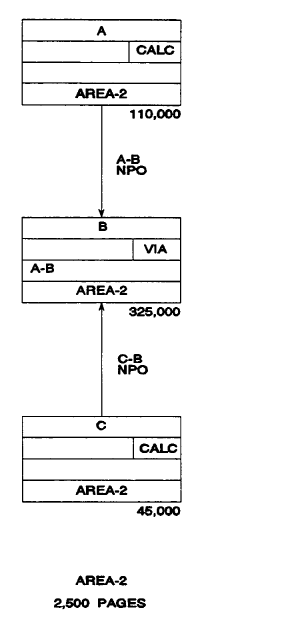
Figure 5.3: AREA-2, Estimating DISCONNECT I/Os
|
Copyright © 2013 CA.
All rights reserved.
|
|