

WALKNEXT applies to Standard auditing only; it does not apply to QuickCheck.
WALKNEXT causes each record in the area to be accessed several times. When you specify WALKNEXT, each set occurrence is walked as many times as there are member record occurrences plus once more for the owner. The result is a significant increase in processing time over normal set walk processing. WALKNEXT not only requires numerous I/Os to complete the audit, but also exponentially increases the number of calls to DBIO regardless of whether or not members are stored VIA the sets being audited.
Use the following formula to calculate the approximate number of I/Os required to audit your database with WALKNEXT. Additional I/Os are needed if CA IDMS/DB Audit detects integrity errors.
I/Os = p + (o *l(l))
p — represents the number of pages swept
o — represents the number of owner records for each CALC or DIRECT set
l — represents the average set length of the CALC or DIRECT set
Figure 5.2 provides an example. If you are auditing USERSETS within AREA-1 with WALKNEXT (set H-G is the only non-VIA set), you would estimate the number of I/Os as follows:
(l = 120,000/20,000 = 6)

   10,000 pages swept
+ 720,000 I/Os for set H-G (20,000 owner records * 36)
= 730,000 I/Os
If the same area were audited without WALKNEXT, the number of I/Os would be approximately:
  10,000 pages swept
+ 120,000 type G records for set H-G
= 130,000 I/Os
Use the WALKNEXT option only if you know or suspect that there are record occurrences that would not be found during normal set walking. To determine whether your database contains orphan records, refer to Set Disconnections.
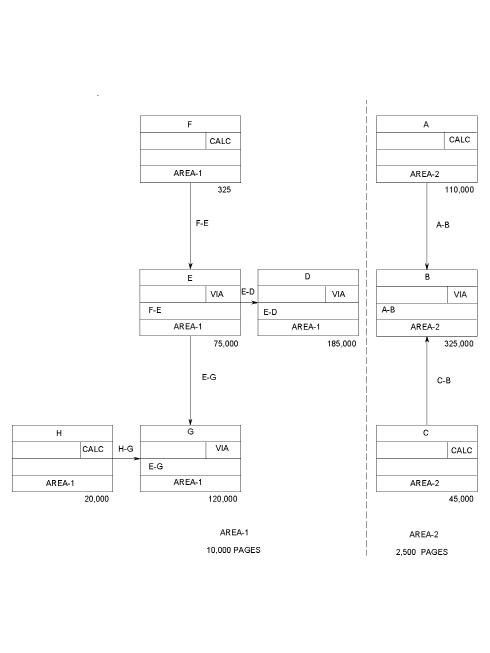
Figure 5.2: AREA-1 and AREA-2, Estimating WALKNEXT I/Os
|
Copyright © 2013 CA.
All rights reserved.
|
|