

An orphan record is one type of error that cannot be detected and adequately diagnosed by simply walking each set once from its owner. If a record points into a set of which it is a member, but neither the owner nor any of the members point to the record, then it is referred to as an orphan record.
One way to detect orphan records is to walk each set, not only when the owner record is detected during sweep processing, but also when each member record of the set is retrieved. In other words, as each record is retrieved during sweep processing, not only are all set occurrences owned by the record walked, but all sets where the current record is a member are walked.
For Standard auditing, you initiate walknext processing by specifying WALKNEXT in the AUDIT statement. For QuickCheck auditing, orphan detection occurs when you specify the USERSETS option. You cannot specify WALKNEXT with QuickCheck auditing.
If you initiate walknext processing, CA IDMS/DB Audit walks all sets of which the retrieved record is a member. If an owner record is encountered, CA IDMS/DB Audit begins walking again from the owner record until it reaches either the original retrieved record or the owner record for a second time. For example, in Figure 2.37, when record GR 79-1 is retrieved during the area sweep, CA IDMS/DB Audit walks forward until the owner record (Bill Smith) is retrieved. Once the owner record is detected, CA IDMS/DB Audit walks forward again until record GR 79-1 is retrieved for a second time.
In order to understand the impact of using WALKNEXT, assume that there are 6,000 STUDENT records and 24,000 GREPORT records. If the STUDENT-GREPORT set is audited using USERSETS, CA IDMS/DB Audit will access 30,000 records (6000 owners plus 24000 members; average set length is 4). When auditing with WALKNEXT, CA IDMS/DB Audit will access 150,000 records (30,000 set walking from the owners and 120,000 set walking from each member record). If GREPORT members are not stored VIA the STUDENT-GREPORT set, CA IDMS/DB Audit will generate 150,000 I/Os, based on an average of 4 member records per set times 30,000 record occurrences, plus 30,000 I/Os for the set walk process.
Note: If you specify WALKNEXT, each set is walked as many times asthere are member records. This multiple walking causes a substantial increase in processing time. You can, however, search for orphans through QuickCheck with the USERSETS option and use significantly less processing time.
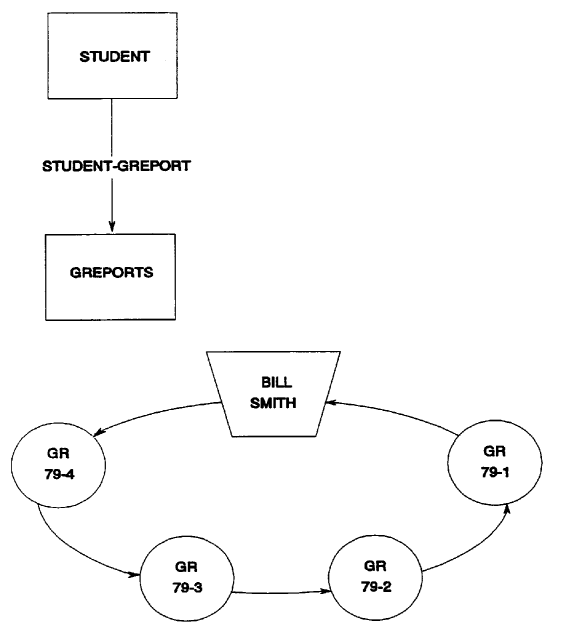
Figure 2.37: Walknext Processing
If an owner record is obtained for the second time, the retrieved record is an orphan. For example, in Figure 2.38, when the Creative Writing record occurrence is retrieved, CA IDMS/DB Audit detects an orphan record. CA IDMS/DB Audit walks from Creative Writing to Remedial English back to ENGLISH. Then it walks from ENGLISH to American Literature to English Literature to Remedial English back to ENGLISH. This sequence indicates that Creative Writing is connected into the set owned by ENGLISH, but cannot be retrieved by walking from the ENGLISH record. Therefore, Creative Writing is an orphan record.
|
Copyright © 2013 CA.
All rights reserved.
|
|