

When you created the prototype of the Department application, you defined skeleton dialogs XXXDADD and XXXDUPD to be displayed by dialog functions in the application. In previous chapters, you completed dialog XXXDADD by adding modules of process commands for the dialog.
In this chapter, you will complete the sample Department application by adding process logic to dialog XXXDUPD. The process modules that you define for the dialog will allow the end user to modify and delete existing department information.
This chapter includes:
The final structure of the sample Department application is shown below. Dialog XXXDUPD is the only component in the application that requires further development. In this chapter, you will enhance dialog XXXDUPD by writing three process modules for the dialog. When you complete dialog XXXDUPD, you will have finished defining the sample Department application. Dialog XXXDUPD, which is executed by functions MODDEP and DELDEP, is the only component in the sample application that requires further development.
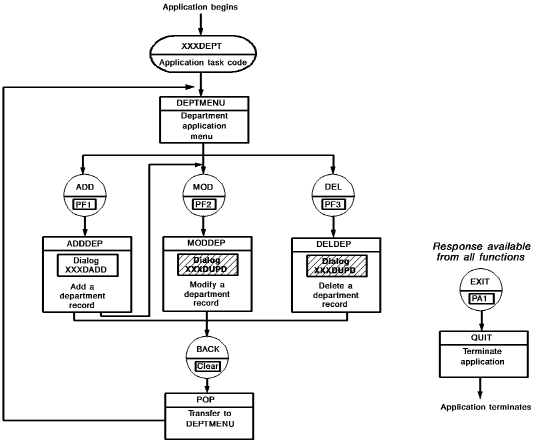
As the diagram indicates, dialog XXXDUPD is executed by both functions MODDEP and DELDEP. Therefore, process modules that you write for dialog XXXDUPD must be able to both modify and delete department information in the database.
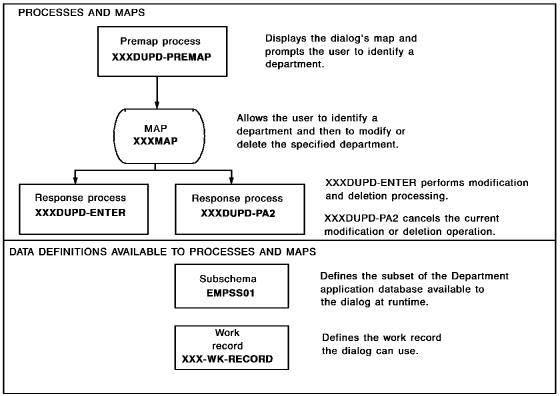
To handle all processing requirements for dialog XXXDUPD, you will define the following premap and response processes for the dialog:
|
Process module |
Type |
Function performed |
|---|---|---|
|
XXXDUPD-PREMAP |
Premap |
Displays the dialog's map with a message prompting the end user for the department to be modified or deleted. |
|
XXXDUPD-ENTER |
Response (associated with the [Enter] key) |
Handles most modification and deletion operations. |
|
XXXDUPD-PA2 |
Response (associated with the [PA2] key) |
Allows the end user to cancel the current modification or deletion operation before the database is updated. |
When you add these process modules to dialog XXXDUPD, you also must enable the process modules to access temporary storage and database information. To do this, you will associate with the dialog any records that define temporary storage and database records. You will add:
You defined work record XXX-WK-RECORD in num=14.Defining Work Records Using IDD.
At run time, the dialog can access any database record in the dialog's subschema. Database administrators (DBAs) typically define subschemas for use by dialogs.
The following diagram shows dialog XXXDUPD with all of its components. To enable dialog XXXDUPD to perform all necessary processing, you will add a premap process, two response processes, a work record, and a subschema to the dialog.
Cancelling a Modification
To protect data in the database, your process modules should make it easy for end users to cancel a modification or deletion operation. As an application developer, you will do this by defining a two-stage procedure for modifying or deleting department records:
Response process XXXDUPD-ENTER performs both stages of a completed modification or deletion operation. This is accomplished at run time by having the status value (Y or N) in element XXX-WK-FIRST-TIME determine which stage is performed. Commands in your process modules change the value in XXX-WK-FIRST-TIME, as appropriate.
Instructions for defining process modules, adding the modules to a dialog, and executing the final application are given on the following pages.
This section contains the following topics:
Defining Process Modules Using IDD
Completing Dialog XXXDUPD Using ADSC
|
Copyright © 2013 CA.
All rights reserved.
|
|