

Flexible Application Development Environment
CA ADS provides a flexible application development environment. You can define application components in whatever order makes the most sense given the application you need to define. For example, you can define the executable structure, screen displays, and runtime flow of control for the entire application before you define any modules of process code for the application. Alternatively, you can fully define all components, including modules of process code, for a subset of the application before even beginning to define components for the remaining application.
Methodology
This manual illustrates CA ADS concepts by showing you how they apply to the definition of a sample application. The methodology presented here shows you one way to efficiently develop a new application by using CA ADS development tools. At your site, other application development strategies may be employed.
Structure Diagram
A useful first stage in developing a new CA ADS application is to develop a structure diagram based on the specifications for the application. Drawing a structure diagram for an application is useful because:
Sample Application
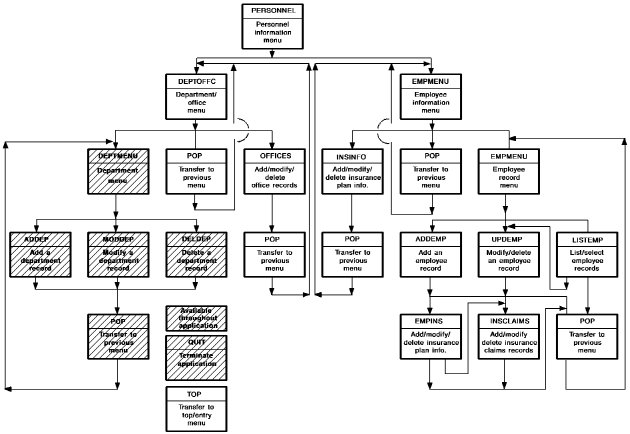
The structure diagram for a small Personnel application is shown below. This application allows users to maintain information on departments and users. Related data, such as office addresses and insurance information, is also collected and stored by using this application. You will develop the Department portion of this application in this manual.
Functions
As shown in this sample structure diagram, the application structure is made up of functions. Each function is related to work performed by the end user on a single screen. For example, the Personnel application includes functions such as ADDDEP, MODDEP, and DELDEP, which allow you to add, modify, and delete department records in the database. Menu functions, such as MAINMENU and DEPTMENU, allow you to select other functions in the application. Other functions allow you to return to previous menus (functions BACK and TOP) and to exit from the application (function EXIT).
To reduce repetition of information, this manual presents steps for developing only the Department portion of this sample Personnel application. Remaining portions of the Personnel application can be added to the Department application at any time. The strategy of defining different portions of applications at different times is particularly useful when developing large applications.
Defining the Application
As soon as the application structure diagram is completed and approved, you can begin to define the application in the data dictionary. In this manual, you will define the sample Department application in two steps:
The CA ADS runtime system simplifies the definition of prototypes by automatically performing many basic processing activities, such as displaying a screen. You can define a prototype without writing any process logic. Additionally, you can execute a prototype application before the database is developed.
Advantages
Advantages to developing a prototype application before defining any process logic for the application include:
|
Copyright © 2013 CA.
All rights reserved.
|
|