

Some applications let you connect to a data source dynamically without first adding or defining the data source. If your application supports this, the CA IDMS DriverConnect dialog appears.
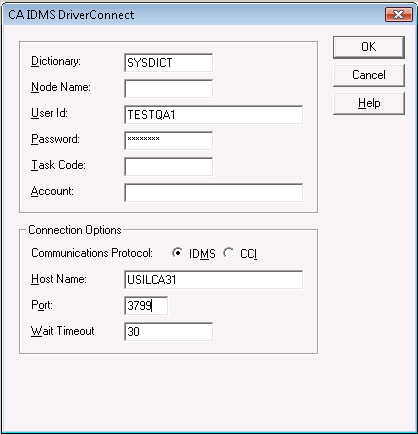
Supply the data source connection information to be in effect for the duration of the session. This information is similar to some of the data source definition information specified with the ODBC Administrator dialog. Detailed information for each of the fields is listed below:
Specifies the DBNAME or segment name of the dictionary containing the definitions of the tables you want to access. This name must be defined in the DBNAME table on the CA IDMS system identified by the server name.
Specifies the Node Name of the system containing the tables you want to access. This is the SYSTEMID specified in the system generation parameters.
Specifies a valid user ID for the CA IDMS system.
Specifies a password field if your system requires it.
Specifies an alternate Task Code to be used for statistics and limit checking. The value you enter must be defined to the CA IDMS system using the TASK system generation statement. If no value is entered, the default Task Code of CASERVER is used.
Specifies your account, if your site requires it.
|
Copyright © 2009 CA.
All rights reserved.
|
|