

Many applications use the Select Data Source dialog to connect to a data source that has been previously defined using the ODBC Administrator dialog. In the Select Data Source dialog, select the desired data source from a list of defined sources and click OK.
The CA IDMS DriverConnect dialog appears, with the name of the data source identified in the Data Source field. This field cannot be changed.
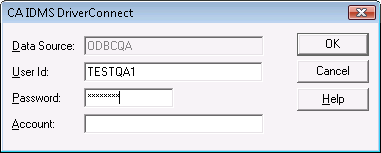
Enter your user ID and password, and, optionally, an account, if your site requires it, in the fields on the CA IDMS DriverConnect dialog. Click OK to connect to the specified data source.
|
Copyright © 2009 CA.
All rights reserved.
|
|