

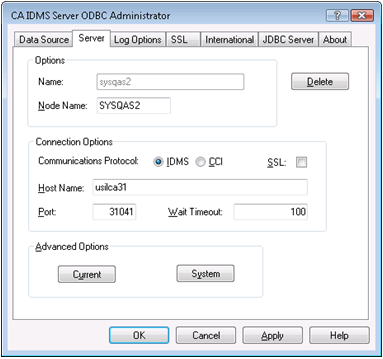
Use the Server tab to specify additional information needed to connect to a CA IDMS system. Depending on the Communications Protocol selected, you may override certain default CAICCI connection options on this tab. The Type 3 and Type 4 JDBC drivers do not use the Server definition. A Server definition can be shared by multiple data sources. Like data sources, there are two types of servers, system and user.
A system server can be used by any data source. It is created when a new name is entered into the Server field of the Data Source tab for a system data source. If you are using UAC on Windows Vista, you must have administrative authority to define a system server.
A user server can only be used by the user's data sources. It is created when adding or editing a user data source by typing a new name in the Server field of the Data Source tab source or modifying an existing system server. When a user server is copied from an existing system server, the system server remains unchanged.
|
Copyright © 2009 CA.
All rights reserved.
|
|