

After creating a translation table, you may need to add EBCDIC/ASCII conversions that are not supported in the standard code pages. The Translation Table Editor provides two edit windows: one for the ASCII to EBCDIC translation table and the other for the EBCDIC to ASCII translation table. To activate either window, select the appropriate option from the Edit menu.
Each window displays a table of 256 hexadecimal values. Each entry in the table represents the output character set code value indexed by the input character set code value.
For example, the following window represents the ASCII to EBCDIC translation table for Canadian French on the PC and U.S. English on the host machine. The ASCII value for a space (' ') in the Canadian French code page is 20 (in hexadecimal). The corresponding EBCDIC value for a space in the U.S. English code page is 40.
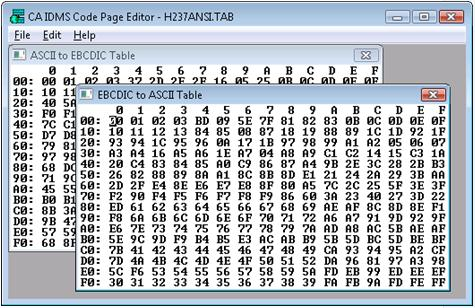
The generated tables convert control codes between their ASCII and EBCDIC equivalents, where possible. (Releases prior to CA IDMS Server r4.0 converted all control codes to x'00' or null bytes.)
To customize the table, use the mouse or keyboard to select a hexadecimal value and replace it with another. The editor ignores all characters except the numbers 0 through 9 and letters A - F (including lowercase). Use the mouse to move the cursor or use the following keystrokes:
|
Key |
Moves Cursor |
|---|---|
|
Arrow keys |
One digit in the direction of the arrow |
|
Home |
To beginning of row |
|
End |
To end of row |
|
PageUp |
To top row |
|
PageDown |
To bottom row |
|
Enter |
Beginning of next row |
|
Ctrl+Left Arrow, Right Arrow |
Left or right one entry |
|
Ctrl+Home, End |
Beginning or end of table |
|
Copyright © 2009 CA.
All rights reserved.
|
|