

Use this option to capture the global values required for building DB2 tables and running DB2 utilities.
Follow these steps:
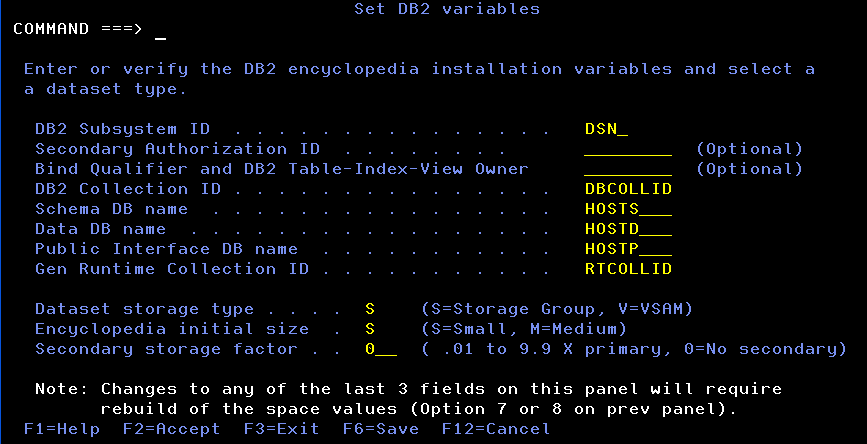
Note: Secondary Authorization ID and Bind Qualifier and DB2 Table-Index-View Owner fields are optional. If entered, they must exist as valid AuthIDs or Group IDs in the security system.
BINDPACK MEMBER(ALL) ... OWNER(xxxxxxx)
CREATE TABLE xxxxx.DOBJ
BINDPACK MEMBER(ALL) ... QUALIFIER(xxxxx)
Where xxxxx is the DB2 Bind Qualifier and DB2 Table-Index-View
Important! If this is an existing installation, values for Bind Qualifier and DB2 Table-Index-View Owner field must be set to the same value as in the current installation.
BINDPACK MEMBER(ALL) ... COLLID(xxxxx)
Where xxxxxx is the DB2 Collection ID
BINDPKRT MEMBER(ALL) COLLID(xxxxxxxx)
Where xxxxxxxx is the Gen Runtime Collection ID
Important! If this is an existing instillation, the values for Data set Storage Type, Initial Data Base Size, or Secondary Storage Factor are stored in TILTAB50 and used to create space values. If you change the values in these fields, TILTAB50 is deleted and your values are lost. For more information on the tasks to complete before changing these values, see the section TILTAB50 in this section.
|
Copyright © 2015 CA Technologies.
All rights reserved.
|
|