

Starting Your Product › How to Configure Without CA CSM › Configuring Host Encyclopedia and Host Construction › Establish the Environment › Tasks to Define Installation Variables › Understanding Regional Settings and Code Pages
Understanding Regional Settings and Code Pages
There are some important aspects of code pages and the DXCPID table that you should understand before selecting a regional setting.
- All new models are stored in the encyclopedia in the code page associated with the regional setting you select. Existing models maintain their original code page association.
- The DXCPID table lists all the possible code page values supported by CA Gen and the corresponding code page value in which new models are translated and stored in the Host Encyclopedia.
- If your country is not listed on the Regional Settings screen, select the Other option.
- All American and Western European code pages are based on a Latin-1 character set and can be successfully translated from one to the other. Countries based on character sets other than Latin-1 often have only one valid code page. The default values defined in the DXCPID table handle these countries regardless of the selection on the Regional Settings screen. For example, Japan has three regional settings: 930, 939, or Other. Other exports code page 930 and code page 939.
- The selections made in the Regional Settings screen do not affect loaded DBCS BiDi (Double-Byte Character Set, BiDirectional) code pages or a non-Western European Latin (such as Turkish) encyclopedia code page entry into DXCPID.
Note: For more information regarding code page translation table, see the Client Server Encyclopedia User Guide. For a full explanation of code page functionality, see the National Language Support Reference Manual, Volume II published by IBM.
Follow these steps:
- Select option 5 on the Installation variables management screen and press Enter.
The Regional settings screen displays.
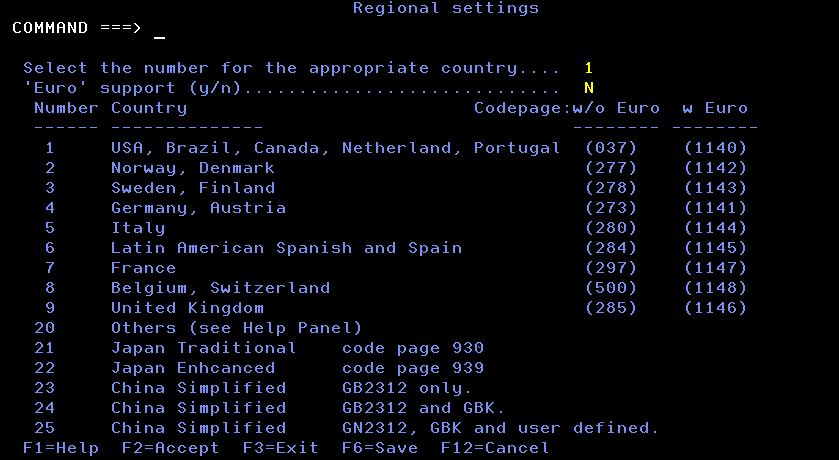
- Enter the number that represents the appropriate country and code page for your site.
- Set the Euro flag to Y to use the Euro sign in your models.
Note: If you are upgrading an existing encyclopedia and set the Euro support flag to Y, you must run DXCPISRT in SPUFI or an equivalent query program to create a table that cross-references ASCII and EBCDIC code pages that have identical character sets. This facilitates the upload and download of models from workstations that have ASCII code pages to the Host Encyclopedia and its EBCDIC code pages. For more information about uploading and downloading models, see Model Code Pages.
- Press F2 to verify and save the entered variables in a working copy of the user's ISPF profile pool.
- When verification is complete, press Enter to exit the Activity Display screen.
- Press F3 to exit the screen.
Copyright © 2015 CA Technologies.
All rights reserved.
|
|