

Starting Your Product › How to Configure Without CA CSM › Configuring Host Encyclopedia and Host Construction › Establish the Environment › Tasks to Define Installation Variables › Set JCL Variables
Set JCL Variables
Follow these steps:
- Select option 3 on the Installation variables management screen and press Enter.
The Set JCL variables screen displays.
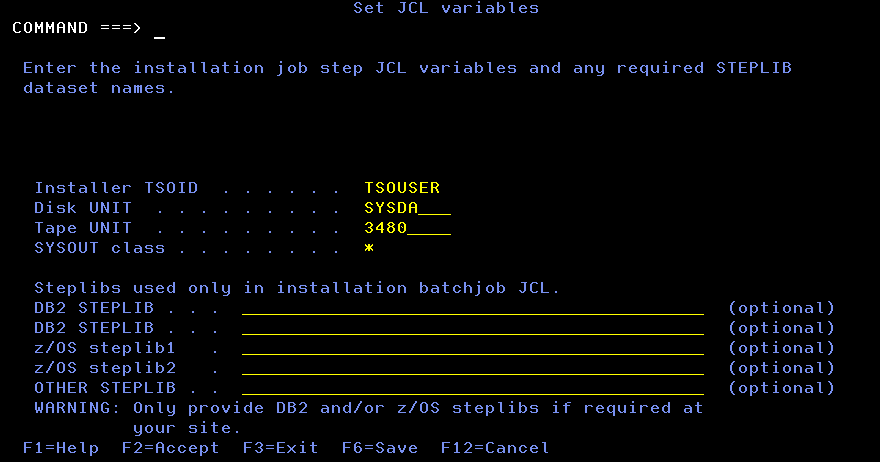
- Verify and complete the fields on the Set JCL variables screen, which is based on these considerations:
- The TSO user ID is required. It is prefixed to the names of the temporary data sets built and used during installation.
- The installation process includes data sets specified here and data sets allocated in the TSO session of the installer to the STEPLIB DD or the ISPLLIB DD into the JCL STEPLIB of the installation. This can result in duplicate data set names in the STEPLIB concatenation in the installation JCL. No action is required if this occurs.
Note: There are some exceptions. JCLs generated by skeletons imbedding STEPDB2 skeleton, for example CEJOB05 or CEJOB06, contains DB2 libraries only in the STEPLIB concatenation if DB2 STEPLIB libraries are specified in the Set JCL variables screen. If no DB2 STEPLIB libraries are specified in the Set JCL variables screen, the installation's JCL would have no STEPLIB DD.
- Press F2 to verify and save the entered variables in a working copy of the user's ISPF profile pool.
- When verification ends, press Enter to exit the screen.
- Press F3 to exit the screen.
Note: The z/OS runtime parameters HEAP, ANYHEAP and THREADHEAP, specify locations for certain types of storage. You must define these parameters to have a value of ANYWHERE to ensure CA Gen processes can acquire storage above the line.
Copyright © 2015 CA Technologies.
All rights reserved.
|
|