

Clicking Back closes this panel and displays the Deployment Options window.
Clicking Generate brings up the Generation and Deployment Progress panel.
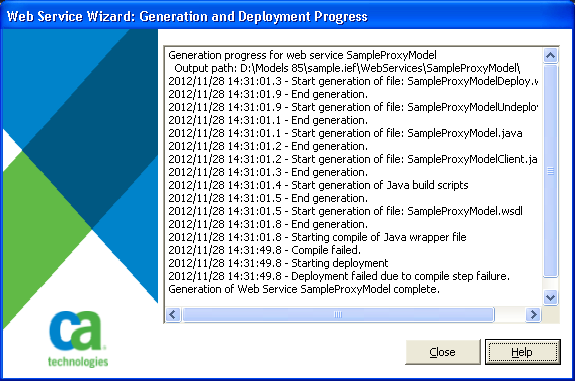
This window shows the progress of the generation process. Following the compile step, a window is displayed showing the results of the compile. After the deployment, another window is displayed showing the results of the deployment. Note that before the deployment step can be run, the window showing the compile results must be closed. To return to the wizard, the Deployment Results window must be closed because the build scripts wait for the windows to be closed before writing out the file that indicates to the wizard that the step has been completed.
The Web Service Wizard generates the following files to the <modelPath>\WebServices\<serviceName> directory:
The XML Java proxy wrapper source file.
A sample java client that calls one of the methods in the service.
Note: If there is more than one method in the service, the sample contains code that calls only one of them.
The compiled Java class file. Note that this file will be located in a directory path that corresponds to the package name where periods in the package name indicate directories. If the package name is blank, this file is generated into the same directory as the remainder of the files (that is, <modelPath>\WebServices\<serviceName>).
The WSDL file for this service.
The Web Service Deployment Description (WSDD) file used to tell Axis that the service is available.
The WSDD file used to remove the service from Axis' view (note that it does not delete the files from the Axis directory).
The Windows batch file used to compile the Java source.
The make file used by the Windows batch file to compile the Java source.
This file contains the results of the compile and deploy steps.
This file is the Windows batch file used to deploy the generated class file and WSDL file as well as all the other parts of the web service.
|
Copyright © 2013 CA Technologies.
All rights reserved.
|
|