

You can specify the appearance settings and style schemes for all the columns in list boxes in a Java Web Generation application by assigning custom video properties to the columns from the Business System Default Video Properties dialog. At the Business System level, you can also specify multiple custom video properties that alternate for the rows in a repeated order.
With the Columns node in the Navigation Diagram Video Properties dialog, you can select a set of custom video properties to replace the default video property for the columns in specific instances of list boxes. With this dialog, you can also select the automatic, alternating, or column specific style schemes for the columns.
The following illustration shows the Columns node in the Navigation Diagram Video Properties with the alternating columns style scheme:
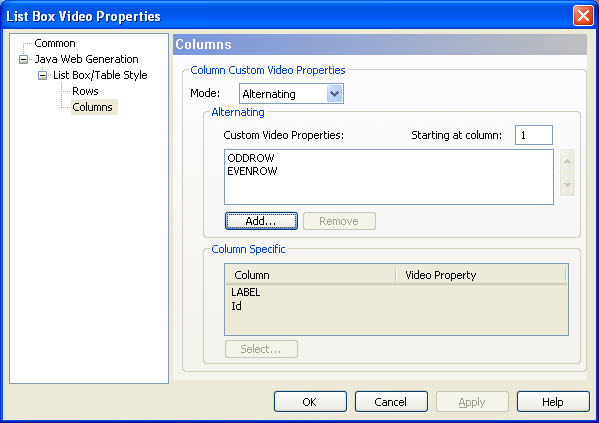
Note: If a list box or a table has only one column, you may specify only one alternating custom video properties. If you specify more than one alternating custom video property, only the first custom video property is used.
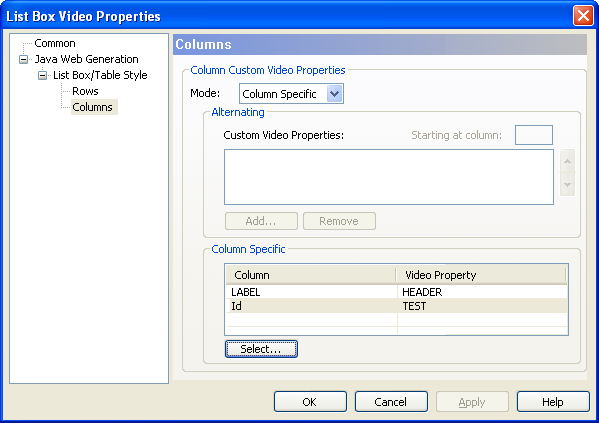
The following illustration shows the Columns node in the Navigation Diagram Video Properties with the column specific style scheme:
|
Copyright © 2013 CA.
All rights reserved.
|
|