

BLOB › Construction and Test › Database Generation › DDL Generation
DDL Generation
We are now ready to generate the DDL. Because we are just introducing a new table, and that table contains the foreign keys, we need only to generate the DDL for that table.
Follow these steps:
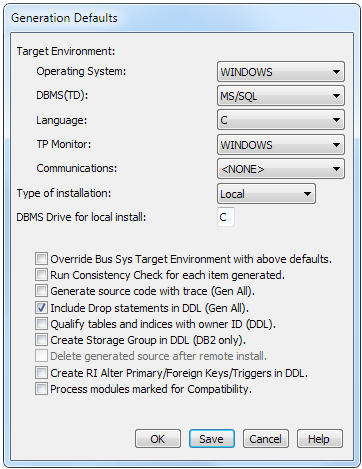
- Open the DDL Generation dialog and then from the Menu Bar click Options, Generation Defaults. Verify the generation default settings look as follows (assuming you are targeting MS/SQL):
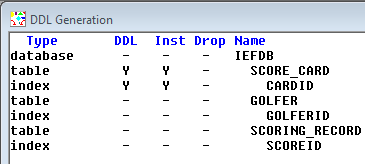
- In the DDL Generation dialog, select the SCORE_CARD table and CARDID index for generation and installation as follows:
- From the Menu Bar, click Generate, DDL, Selected. The DDL Generation dialog will change to report that the generation completed and then will automatically launch the Build Tool.
- The Build Tool will open and you may be prompted to logon to the database. If everything completes successfully, the Build Tool displays the Build-OK status as follows:

Copyright © 2013 CA.
All rights reserved.
|
|