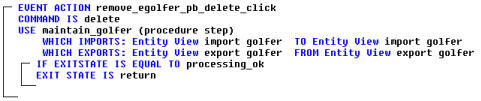
Open the action diagram by selecting the Action Diagram icon on the Toolbar. The new EVENT ACTION remove egolfer pb delete click has been added to the bottom of the action diagram. The event logic will be very similar to the Update eGolfer logic added from the last section.
Copy the logic in the EVENT ACTION update egolfer pb update click, starting with the COMMAND IS statement and ending with the bottom of the brackets associated with the IF EXITSTATE IS EQUAL TO statement to the Remove eGolfer event.
Change the COMMAND IS update statement to COMMAND IS delete.
In the IF EXITSTATE IS processing ok statement, delete CLOSE Dialog Box UPDATE GOLFER DB and add the statement EXIT STATE IS return in its place.
Save your model.
The completed event handler should look like the following example: