Previous Topic: Edit the Action DiagramNext Topic: Remove eGolfer


Delete Extra Views

Follow these steps:

  1. From the Menu Bar select View, and then select Expand All Views.
  2. In the IMPORTS:, select Entity View import 1 golfer.
  3. With the Ctrl key held down, select Entity View import confirmation 1 golfer.
  4. Scroll to the EXPORTS: and, with the Ctrl key still held down, select Entity View export 1 golfer.
  5. With the Ctrl key still held down, select Entity View export confirmation 1 golfer.
  6. From the Menu Bar select Edit, then Delete Views…. Select Yes at the confirmation.
  7. Save your model.

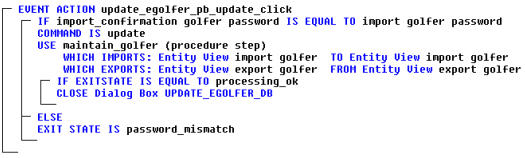
    The completed Event Handler should look like the following example:

    Delete Extra Views

  8. Close the action diagram.