

To build CA Gen generated applications that target NonStop SQL/MX, use the Build Tool. The Build Tool is a delivered Java application that supports building NonStop SQL/MX applications.
The relationship of processing remote files to the other required and optional IT tasks are described in the following illustration:
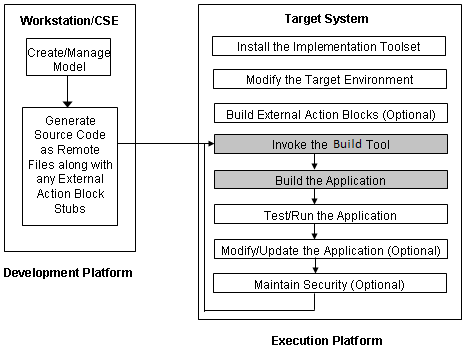
After generating the remote files on the development platform, they are:
A script controls the processing of each load module and RI trigger set. The Build Tool includes a set of scripts you can customize to include many types of information specific to your target system.
Note: For more information about invoking and using the Build Tool, with selecting and customizing scripts, see the Build Tool User Guide.
When migrating to the latest CA Gen environment, it may be necessary to recompile and relink your application. This may be due to a number of reasons, including operating system upgrades, compiler upgrades, and third-party product upgrades.
Note: For more information about release specific instructions, see the Release Notes.
Once the application is built from the Build Tool, several tasks are performed before the application can be tested, run, or both. A summary of tasks is as follows:
These tasks are explained in the following sections.
Several steps are taken to set up the SQL/MX tables to be used with the application only built. The generated remote file representing the database information contains the data definition language use to create the SQL/MX tables. The following steps are taken to create and register the SQL/MX tables using this file:
Use mxci to create the catalog and schema. Use the same values that are given with Build Tool tokens OPT.MODULE_CATALOG and OPT.MODULE_SCHEMA for the catalog and schema names.
You can obey the INS file found in the database remote file to create the tables. Split the database remote file (using the Build Tool) to extract the INS file.
Use mxCompileUserModule to register the modules. Use the same values that are given with the Build Tool tokens OPT.MODULE_CATALOG and OPT.MODULE_SCHEMA for the catalog and schema names.
Optionally, building of the application generates two files, MX and MX-INPUT. Using the previous tokens, with OPT.MODULE_LOCATION, these files provide a simple script to perform the previous steps. These scripts can be customized as one sees fit.
Because the application has been built using the Build Tool, several steps are taken to create the Guardian target environment. The Build Tool does not interact with Pathway and therefore cannot create the Guardian target environment as part of the build process. However, the Build Tool generates several files that aid in creating the Guardian target environment. The Build Tool tokens OPT.NS_SERVER_TARGET_VOLUME and OPT.NS_SHORT_MODEL_NAME represent the Volume and Subvolume of the Guardian target environment.
Note: When creating cooperative servers, many of the steps that are taken to create the Guardian target environment are not needed. Those required for the BlockMode applications are indicated.
The following steps are taken to create the Guardian target environment:
Use sqlci to create the catalog. Use the same values given with Build Tool tokens OPT.NS_SERVER_TARGET_VOLUME and OPT.NS_SERVER_SHORT_MODEL_NAME for the volume and subvolume names.
Several Pathway files are generated as part of the application build using the Build Tool. The following list of files are FTP’d to the Guardian target environment:
If FTP’ing manually, ensure that the *.pwy files are renamed in the Guardian target environment without the .pwy file extension.
Optionally, an additional TACL macro FTPFILES has been generated that aids in FTP’ing these files. This file is modified to provide the hostname, userid, and password. Manually FTP’ing this file to the Guardian target environment and executing will FTP the list of files automatically.s
The CA Gen IT delivers additional files are required to run the generated application. The following list of files are copied to the Guardian target environment:
The generated file FUPFILES was FTP’d and can be obeyed to copy these files to the Guardian target environment.
To run the AEF to test/run the generated application, the AEF uses a table that is created and populated. The generated file SQLTMT can be executed that performs the following steps:
The file SQLTMT has been generated to assist with these steps. This file should have been FTP’d to the Guardian target environment, and can be run to execute the previous steps.
Now, that the target environment has been created, the application can be tested, run, or both.
|
Copyright © 2015 CA Technologies.
All rights reserved.
|
|