

Generating and Building Cooperative Code for WebSphere MQ › Override Generation Defaults › Overriding in the Toolset
Overriding in the Toolset
You can override the settings for the communication environment parameters for a build in the Toolset.
Follow these steps:
- Do one of the following:
- Select Construction, Generation from the Model window of the toolset
- Double-click Generation in the Diagrams page of the Tree View.
- Select Options, Generation Defaults, which opens the Generation Defaults dialog
The Generation Defaults dialog appears.
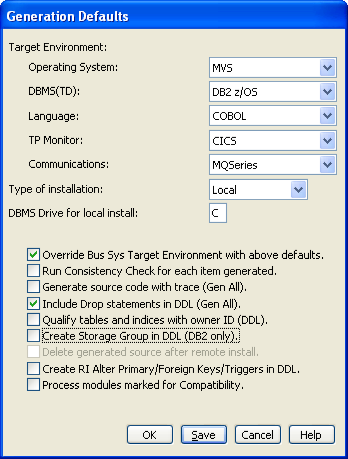
- Set the TP Monitor field. The valid TP Monitor entries based on the operating system you select are as follows:
- Z/OS
-
CICS
IMS
- UNIX
-
IEFAE
- Windows
-
IEFAE
- Select MQSeries in the Communications field
- Select the Override Business System Target Environment check box.
- Click OK.
Copyright © 2013 CA.
All rights reserved.
|
|