

Specifying Properties for WebSphere MQ Applications › Specify Properties Through the CSE Construction Client › Set MQSeries Properties
Set MQSeries Properties
From the Construction Client, you can set the MQSeries properties for an application during packaging.
Follow these steps:
- Start from the List Load Modules dialog box.
- Select a server manager.
- Select Detail, Properties. Then click the MQSeries tab to open the Server Manager Properties (MQSeries) dialog box.
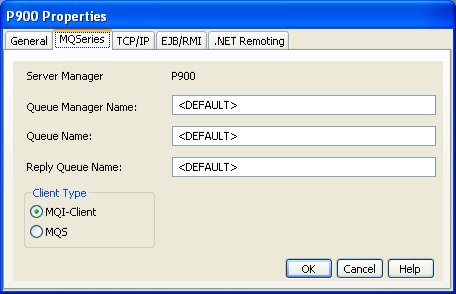
- Provide the MQSeries parameters for your application. You can keep any value designated as <DEFAULT>.
- Choose the client type for your application.
Note: For information about the default values, see Set MQSeries Properties.
- Click OK.
Copyright © 2013 CA.
All rights reserved.
|
|