

Specifying Properties for WebSphere MQ Applications › Specify Properties Through the CSE Construction Client › Set Server Environment Parameters
Set Server Environment Parameters
From the Construction Client, you can set the WebSphere MQ Server Environment Parameters for an application during packaging.
To configure WebSphere MQ Parameters for an application
Follow these steps:
- Start from the Construction Model Selection window.
- Select Code, Package, Cooperative, to start the Cooperative Packaging dialog box.
The Cooperative Package dialog box shows Business Systems. It allows you to set the TP Monitor for an entire Business System through Detail, Configuration. However, you only can set the communications parameter to MQSeries by continuing with the following steps.
- Select a Business System in the Cooperative Packaging dialog box.
- Choose View, Expand to open the List Load Modules dialog box.
- Configure the WebSphere MQ server manager environment parameters for each of the server managers in the List Load Modules dialog box.
To configure the WebSphere MQ server manager environment parameters
Follow these steps:
- Select a server manager.
- Choose Detail, Configuration. The Server Manager Environment Parameters dialog box opens.
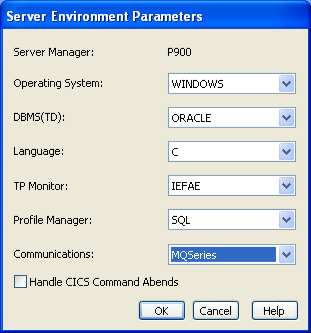
- Set the TP Monitor to one of the following parameters based on the Operating System you selected:
- Z/OS
-
CICS
IMS
- UNIX
-
IEFAE
- Windows
-
IEFAE
- Select MQSeries in the Communications field
- Click OK.
Copyright © 2013 CA.
All rights reserved.
|
|