

Similar to the previous discussion, the Client Manager can make use of a generated GUI application to drive the testing of a particular Comm. Bridge.
The following diagram illustrates a generated GUI client application being used to drive the testing of a Comm. Bridge. The Client Manager provides the network connectivity from the DPC to the Comm. Bridge.
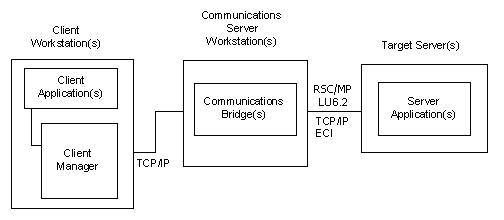
Alternately, the Client Manager is able to simulate a cooperative flow request without the use of a DPC application. The Client Manager Send Test Tran operation builds a simulated CFB using the Test Tran name that is associated with a selected target server.
To test a specific Comm. Bridge the user of a Client Manager selects its associated server entry from its list of configured servers. After selecting, the user can request the Client Manager to Send a Test Tran. This mechanism allows the Client Manager to simulate a cooperative flow request that results in the Client Manager sending a Test transaction to the selected target server for processing.
CA Gen provides various implementations of an ECHO server application that can be used as a designated test transaction. The various implementations of ECHO exist for the various server execution environments a Client Manager is capable of servicing such as CICS, IMS, Transaction Enable and Tuxedo.
See the Distributed Processing - Client Manager User Guide for steps used to execute a Test Transaction.
A successful execution of the Test Transaction from the Client Manager through the Comm. Bridge to the target server environment confirms the communication infrastructure is working and is able to support subsequent cooperative flow requests.
|
Copyright © 2013 CA.
All rights reserved.
|
|