

When you change the default layout of the main window, the Diagram Trace Utility automatically saves the new layout configuration as the current perspective when you exit the window. Each time you start the Diagram Trace Utility, the current perspective is displayed, unless you restore the default perspective. You can change the window layout by opening new views, closing views, and rearranging views.
The following illustration shows a current perspective that you can create by closing several views and rearranging the remaining views. In this example, the PAD Code View editor is highlighted, which indicates that it is currently the active component in the main window of the Diagram Trace Utility.
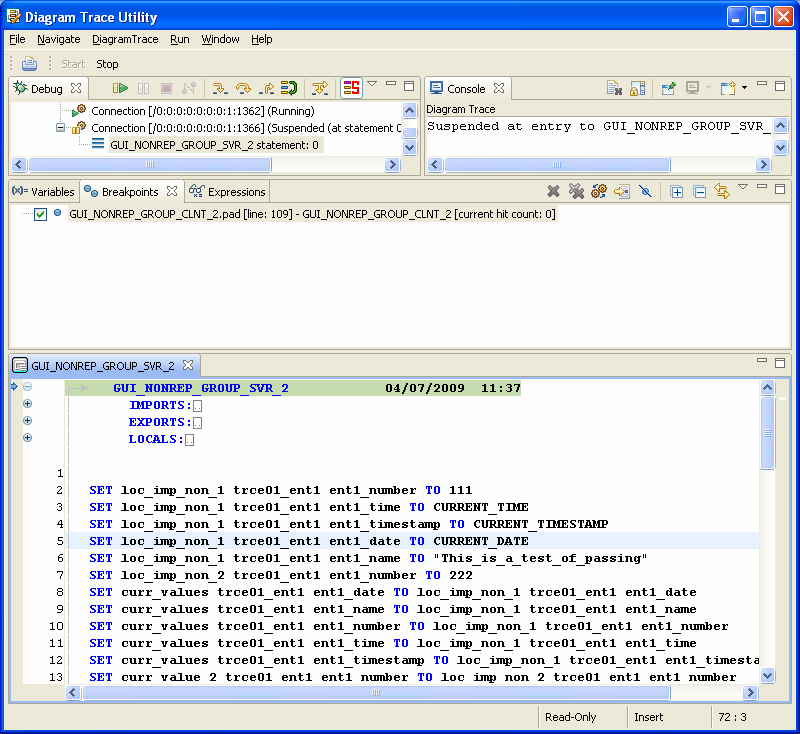
Note: View and PAD Code View editor window components can be active or inactive, but only one component can be active at any one time.
|
Copyright © 2013 CA.
All rights reserved.
|
|