

Running a Debug Session › Manage Bookmarks › Add the Bookmarks View to the Current Perspective
Add the Bookmarks View to the Current Perspective
The Bookmarks view displays all bookmarks you have created.
To add the Bookmarks view to the current perspective, select Show View, Bookmarks from the Window menu.
The Bookmarks view displays the bookmarks you created.
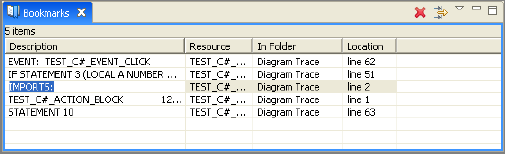
Following is the description of the different columns in the Bookmarks view:
- The Description column contains a description of the bookmark. To change the description, right-click, and select Properties from the pop-up menu.
- The Resource column lists the .pad file name that the Diagram Trace Utility uses to store a cached version of the Action Diagram being traced.
- The In Folder column specifies the folder in which the resource resides.
- The Location column indicates the line number of the bookmark in its Action Diagram.
Copyright © 2013 CA.
All rights reserved.
|
|