

Information about packaging, generating/installing, and testing a distributed process application is discussed in detail in the Workstation Construction User Guide. In short, package the distributed process business system for local testing and for production (the target platform). For local testing, package the application for window packaging. Package the client and the server procedure steps as GUI load modules.
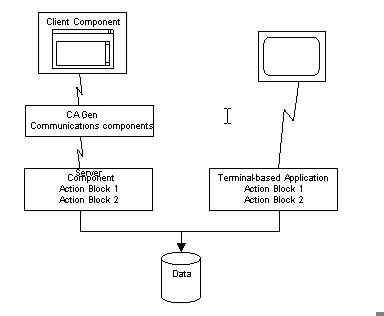
Generate and install the distributed process application for local testing. Test the application. After you complete local testing, generate and install the application for the target platforms. The server component on the host platform can run concurrently with the terminal-based application. The same action block logic can access a common database.
The following illustration shows reusable action blocks for different types of applications.
|
Copyright © 2013 CA.
All rights reserved.
|
|