

With CA Gen Toolsets, you can modify an existing model and add the distributed process style. You can continue to use the existing application as you phase in the distributed process application. The action blocks in the existing model are reusable in the distributed process application.
This section explains how to add the distributed process style to a terminal-based (block mode) application, but the principles also apply to converting a GUI application.
The following details the main tasks required for converting an existing application to a distributed process application:
These tasks represent a fast way to convert an existing terminal-based application (preferably a small application). The intent is for you to create quickly a distributed process application that works. This lets you begin exploring client/server computing as soon as possible. Fast, however, does not necessarily mean best. Any redesign of an application should take into account all of the information discussed in the Client Server Design Guide. Even so, the knowledge gained from a quick conversion is beneficial to future design work.
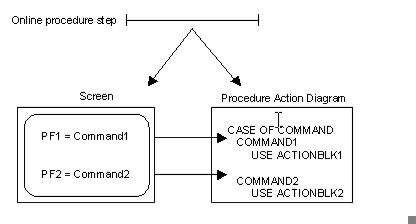
Typically, a terminal-based application contains online procedure steps. The procedure steps are associated with screens, which use function keys to invoke commands. The commands are interpreted by the PrADs through a CASE OF COMMAND structure.
The following illustration shows an example of a terminal-based procedure.
|
Copyright © 2013 CA.
All rights reserved.
|
|