

Create an interface from a procedure step of a business system. Later, you can edit the interface to customize its details.
Follow these steps:
The Procedure Steps of the Business System are displayed.
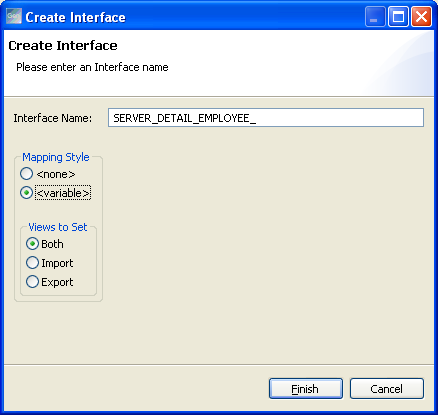
Note:
The mapping style determines which attributes are included as part of the interface and which attributes to exclude. System attributes are not included. After the interface is created, you can change individual attribute mapping styles within the editor.
Default: <None>
Specifies that no attributes of the interface are exposed to the end user.
Specifies that all the attributes of the interface are exposed to the end user and allows the end user to enter data into this parameter. You can rename this parameter to add a user-friendly name.
Note: If you want to expose only a few attributes of the interface, specify the Mapping Style as <Variable>. You can modify the attribute details later while customizing the interface.
This option is available only when you specify the Mapping Style as <Variable>.
Indicates that attributes in both import and export views are mapped according to the mapping style set in the previous step.
Indicates that only attributes in the import view are mapped according to the mapping style set in the previous step.
Indicates that only attributes in the export view are mapped according to the mapping style set in the previous step.
The interface is added under the procedure step in the Interfaces view.
|
Copyright © 2015 CA Technologies.
All rights reserved.
|
|