

Comparing Objects in Different Models › FAQs About Compare Report › How Are Object Differences Reported?
How Are Object Differences Reported?
The differences that are reported depend on the report sections you select to include. When you select sections to report, the options are: Source only, Destination only, Same, Different, and All. The following figure shows the mapping of these selections to the headers on the four report sections. Note that All would apply to all sections:
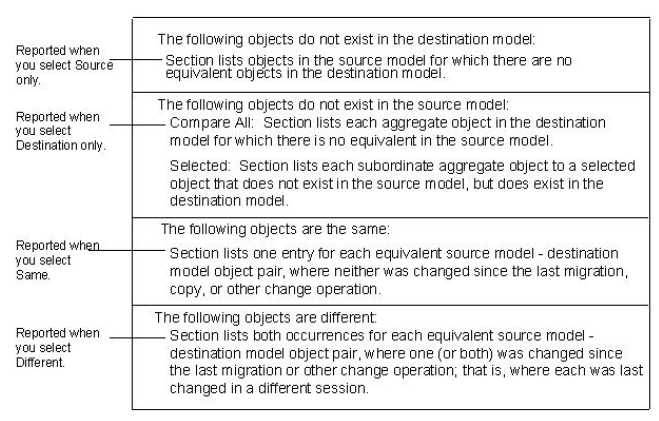
If you compare selected objects, each object you select from the source model and each of its components are reported in one of three ways:
- As being the same version as an equivalent object in the destination model,
- As being a different version from an equivalent object in the destination model, or
- As not existing in the destination model.
If you select Destination only, this additional the following information is reported:
- If you compare selected objects and any selected objects have subordinates that exist in the destination model but do not exist in the model from which you select objects, they are reported as not existing in the source model.
- If you compare all objects, all aggregate objects in the destination model for which there are no equivalent objects in the source model are reported as not existing in the source model.
Copyright © 2013 CA.
All rights reserved.
|
|