

Encyclopedia Communications › Examples of Communication Tasks › Gendelta from Child and Apply to Parent
Gendelta from Child and Apply to Parent
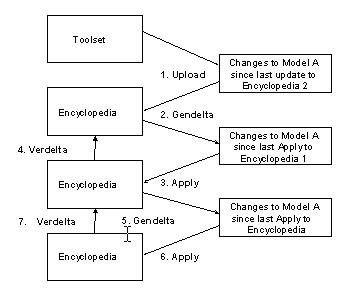
The following illustration explains uploading a model from the toolset, generating a transaction file of changes to the model, applying the changes successively to more than one encyclopedia and back to the original encyclopedia. Verdelta verifies the successive applies.
Follow these steps:
- Upload to Encyclopedia 2.
- Generate a transaction file of changes that are made to Model A since the last Apply to Encyclopedia 1. This file may include multiple Uploads. Apply changes to Encyclopedia 1.
- Verify apply to Encyclopedia 1 by moving the everify.trn file to Encyclopedia 2 and running verdelta.
- Generate a transaction file of changes to Model A since the last Apply to the encyclopedia.
- Apply the changes to the encyclopedia.
Verify apply to encyclopedia by moving everify.trn file to Encyclopedia 1 and running verdelta.
Copyright © 2015 CA Technologies.
All rights reserved.
|
|