

Encyclopedia Communications › Examples of Communication Tasks › Extract from Parent and Load Children
Extract from Parent and Load Children
The following illustration explains extracting a model or subset from an encyclopedia, loading the model to more than one encyclopedia, and downloading the model to the toolset.
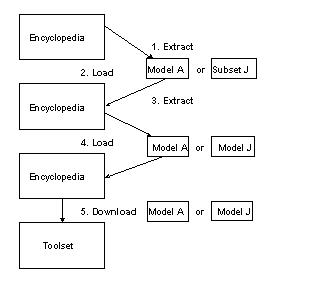
Illustration Key
Follow these steps:
- Extract the model or subset from the encyclopedia. The encyclopedia marks the parent model as checked out.
- Load the extracted model or subset to Encyclopedia 1. Subsets extracted from the parent become models on the destination encyclopedia.
- Extract Model A or Model J from Encyclopedia 1. Encyclopedia 1 marks the model or subset as checked out.
- Load the extracted Model A or Model J to Encyclopedia 2.
- Download Model A or Model J to a toolset. Encyclopedia 2 marks the model or subset as checked out.
You can change the model on the toolset and can move the changes to Encyclopedia 2, Encyclopedia 1, and the original encyclopedia.
Copyright © 2015 CA Technologies.
All rights reserved.
|
|